
What Is WordPress and Why It Dominates Modern Web Design
WordPress is more than just a website builder — it’s the backbone of the modern web. Powering over 40% of all websites worldwide, WordPress has evolved from a simple blogging tool into a full-fledged content management system (CMS) trusted by individuals, startups, and global enterprises alike. Whether you’re building a personal blog, a business website, or a complex eCommerce store, WordPress gives you the flexibility, scalability, and creative freedom to bring your ideas to life.
In this article, we’ll explore what makes WordPress so dominant in the world of web design and why it continues to be the preferred platform for professionals and beginners alike.
1. The Evolution of WordPress

Launched in 2003 by Matt Mullenweg and Mike Little, WordPress began as an open-source blogging platform. Its mission was simple — to make publishing content on the web accessible to everyone. Over time, it transformed into a robust CMS capable of handling anything from blogs and portfolios to large-scale corporate websites.
Today, WordPress has two major forms:
- WordPress.org – The self-hosted version that gives you full control, customization, and plugin access.
- WordPress.com – A hosted version offering convenience for beginners with limited customization.
The open-source nature of WordPress allows developers around the world to contribute to its growth, making it a constantly evolving ecosystem.
2. Why WordPress Dominates Web Design
There are several reasons WordPress continues to be the most widely adopted CMS in the world.
a. Open Source & Free
WordPress is completely free to use. You only pay for hosting and domain registration. Its open-source license means developers can modify the code, build plugins, and create themes freely – contributing to an ever-growing library of tools.
b. Easy to Use
With its intuitive dashboard, WordPress eliminates the need for deep technical knowledge. Beginners can publish a page or post within minutes. Drag-and-drop builders like Elementor or Divi make it even easier to design stunning pages visually.
c. Highly Customizable
From simple blogs to large eCommerce sites, WordPress can do it all. With over 60,000 free plugins and 10,000+ themes, there’s virtually no limit to customization. You can tweak your site’s design, functionality, SEO, and performance — all from one dashboard.
d. SEO-Friendly Architecture
WordPress is built with clean code and a structure that search engines love. Plugins like Yoast SEO and Rank Math make on-page optimization simple — helping you improve rankings and visibility with ease.
e. Scalable and Flexible
As your business grows, WordPress grows with you. Whether you need a membership site, multilingual setup, or online marketplace, WordPress scales effortlessly with proper hosting and maintenance.
3. WordPress for Every Type of Website
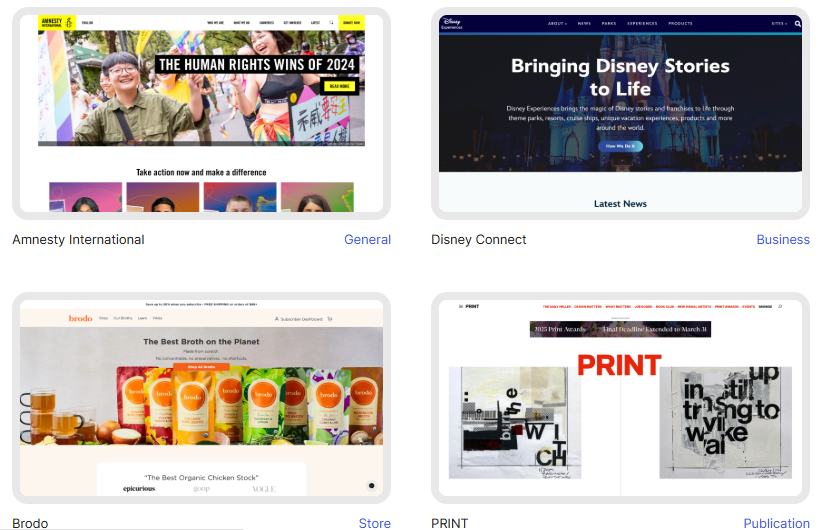
One of the biggest strengths of WordPress lies in its versatility. You can build:
- Blogs & Magazines – Great for content creators and publishers.
- Business Websites – Perfect for agencies, freelancers, and small businesses.
- E-Commerce Stores – With WooCommerce, you can sell products, manage payments, and handle orders.
- Portfolio Websites – Showcase your work beautifully with gallery themes.
- Educational Platforms – Use plugins like LearnDash or Tutor LMS for online learning.
- Membership Sites – Offer premium access or paid subscriptions easily.
This adaptability makes WordPress suitable for any niche or industry.
4. The Power of the WordPress Community
Another reason WordPress dominates web design is its global community. Thousands of developers, designers, and agencies contribute plugins, themes, and tutorials daily. If you ever face a problem, there’s likely a solution or a discussion already available in the forums.
Additionally, WordPress hosts global events like WordCamps — where users and experts collaborate to share knowledge and innovations.
5. WordPress + WooCommerce = The Perfect Pair
For businesses aiming to sell online, WooCommerce turns a standard WordPress site into a fully functional eCommerce platform.
- Manage inventory, taxes, and shipping.
- Integrate payment gateways like PayPal, Razorpay, or Stripe.
- Customize store design with themes like Astra or Flatsome.
- Track sales and analytics directly from the dashboard.
This integration allows designers and business owners to run a complete store with the same flexibility WordPress provides.
6. The Future of WordPress
WordPress continues to evolve rapidly. With the Gutenberg Block Editor, content creation has become more visual and intuitive. The CMS is also moving towards headless architecture, enabling developers to use WordPress as a backend with front-end frameworks like React or Next.js – combining ease of use with modern performance.
The introduction of AI-powered plugins, security automation, and multi-channel publishing further cements WordPress’s role as the future-ready platform of web design.
Conclusion
WordPress remains the king of web design because it balances simplicity with limitless potential. It empowers individuals to build, scale, and manage websites without relying heavily on developers – while still giving professionals the tools to create enterprise-level solutions.
If you’re planning to build your website or revamp your online presence, WordPress should be your starting point.
And if you need expert help, our team specializes in WordPress and WooCommerce website design – from concept to launch, we craft sites that look stunning and perform beautifully.


























0 Comments