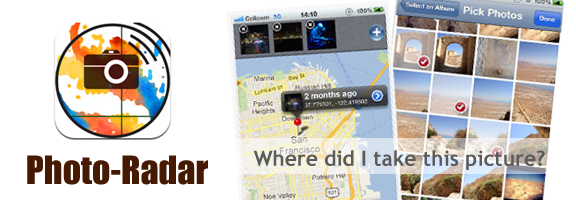
Photo-Radar : iOS App to Mapping Out Your Photos

by | Oct 17, 2012 | Reviews | 0 comments

One of the most attractive features of iPhone or iPad is its picture-perfect camera that comes with it. The screen resolution, picture quality and its ability to enhance the contrasting colors in the picture are the factors that make the iCamera a class above the rest. Due to our tendency to click more photos than is required, we kind of forget the petty details and the context against which a particular photo was clicked. Photo-Radar does the exact task of tagging the location and the timestamp against every photo clicked. It acts as a virtual memory assistant to your iCamera.

Whoever or wherever you are, if you happen to be a geeky traveler or an adventurous freak or just an enthusiastic person who is always trying to capture all moments precious to you, the Photo-Radar is a must-download for you. What this app does is it stores the GPS co-ordinates of the place that you tag, which is the most accurate parameter of a geographical location, and sets the current timestamp for the photo. It has an in-built map interface that communicates with the complete geographical information of the earth. And this app costs just $0.99 that hardly pinches your pocket. There is also a Photo-Radar Lite version which is free.

Featured Highlights

  • Exact longitude and latitude co-ordinates of the location where the photo is taken, are recorded
  • Existing photos too can be tagged by pointing out the location on a map
  • Any number of photos can be linked to a particular location on the map
  • The co-ordinates of a certain picture can be copied onto clipboard and pasted onto an SMS or Google Maps or just anywhere in the iOS. This feature also enables the user to share with their friends on social networking sites
  • Requires iOS 3.2 and above which means, it is installable on iPhone 3GS+ and all iPads

Pros

Since this app directly communicates with the map, we can easily find the route to and from the tagged location as per our preference. It is a very easy to use app since its user interface is very much connected to the supporting apps like camera and maps and they can be directly accessed, i.e., through the ‘Open in Maps’ option, the location of the photo is opened on Google Maps and route can be obtained through navigator app.

Cons

At times it turns out to be an added complexity to your relatively simple camera. On the installation of this app, you immediately get two folders namely ‘Saved Photos’ containing existing photos that has no co-ordinate information, and ‘My Photos’ that would contain all the tagged photos. And you need to tag each photo one by one. It would be easier if this app is built into the iOS, so that it exists by default.

Summary

Kudos to STDM Apps for conceiving this brilliant app in the nick of time, probably waiting for Apple Inc. to knock on their doors sometime. If you are a perfectionist looking to save your photos with their context and importance for posterity, then look no further than this pp. Photo-Radar is certainly a smart app worthy of all iDevices. You can view the App Video here.

Worth Having Application – Download the Application

Article Summary by AI

Capture your memories with Photo-Radar! This app tags your photos with GPS coordinates and timestamps, making it perfect for travelers and adventurers. Easily link, share, and explore your pictures on an interactive map—all for just $0.99! #PhotoRadar #Memories 🎉📸

YOU MAY ALSO LIKE THESE

Top 5 Online Course and LMS Platforms for Creators in 2026

Top 5 Online Course and LMS Platforms for Creators in 2026

Turning genuine expertise into a structured, sellable online course used to require piecing together separate video hosting, payment processing, and student progress tracking tools manually, a genuinely significant technical barrier for creators who just wanted to...

Top 5 Inventory Management Web Apps for Small Business in 2026

Top 5 Inventory Management Web Apps for Small Business in 2026

Tracking inventory through a spreadsheet or, worse, memory alone works fine for a business with a handful of products, but it breaks down quickly once a growing catalog spans multiple sales channels, a physical location, and an online store simultaneously, each...

Top 5 Helpdesk and Customer Support Web Apps in 2026

Top 5 Helpdesk and Customer Support Web Apps in 2026

A shared email inbox works fine for customer support right up until multiple team members start replying to the same message, or a customer's history gets lost across a dozen scattered email threads with no clear record of what was already promised. Helpdesk and...

Top 5 Email Marketing Web Apps for Small Businesses in 2026

Top 5 Email Marketing Web Apps for Small Businesses in 2026

Despite years of predictions that email marketing would fade in favor of social media, it consistently remains one of the highest-return marketing channels available to small businesses, largely because it reaches people in a space they actually check regularly rather...

Top 5 Payroll and HR Web Apps for Small Teams in 2026

Top 5 Payroll and HR Web Apps for Small Teams in 2026

Payroll is one of those business tasks where a small mistake carries an outsized cost, whether that's a missed tax filing deadline or an employee paid incorrectly two pay periods in a row. Manually tracking hours, deductions, and benefits in a spreadsheet works right...

Top 5 Customer Support Helpdesk Web Apps Compared in 2026

Top 5 Customer Support Helpdesk Web Apps Compared in 2026

Once a business grows past a handful of customers, a shared inbox stops being enough to manage support requests, tickets get missed, response times slip, and nobody has a clear view of what's actually outstanding across the whole team. A proper helpdesk web app fixes...

Best Scheduling and Booking Web Apps for Businesses in 2026

Best Scheduling and Booking Web Apps for Businesses in 2026

The back-and-forth of finding a mutually available meeting time still eats up more time than it should for a huge number of businesses, especially client-facing ones juggling appointments across multiple staff members or service types. A good scheduling web app...

Top 5 No-Code Website Builders in 2026

Top 5 No-Code Website Builders in 2026

No-code website builders have closed the gap with custom-coded sites so significantly that most small businesses and freelancers genuinely no longer need a developer just to launch a professional-looking website. The real differences between the top platforms now come...

Best Invoicing and Billing Web Apps for Freelancers in 2026

Best Invoicing and Billing Web Apps for Freelancers in 2026

Chasing late payments is one of the most draining parts of freelancing, and a surprising amount of that friction comes down to sending invoices that look unprofessional, lack clear payment terms, or make it genuinely inconvenient for a client to actually pay. The...

Top 5 Email Marketing Platforms Compared for SaaS in 2026

Top 5 Email Marketing Platforms Compared for SaaS in 2026

Email remains one of the highest-return marketing channels a SaaS company has, but only if the platform behind it handles deliverability, automation, and segmentation properly at scale. Picking the wrong tool early on tends to cause real pain later, migrating a large...

Best Email Marketing Web Apps in 2026 Reviewed

Best Email Marketing Web Apps in 2026 Reviewed

Email marketing consistently delivers the highest return on investment of any digital marketing channel in 2026, with industry analyses regularly showing returns of thirty to forty dollars for every dollar invested in well-executed campaigns. The platform you use to...

Best CRM Web Apps for Small Business in 2026

Best CRM Web Apps for Small Business in 2026

A CRM - Customer Relationship Management tool - is the single highest-leverage software investment most small businesses make in 2026. Without one, client information lives across email threads, spreadsheets, sticky notes, and individual team members' memories,...