Chapter 8: Limit Number of Uses Per Customer 🔒
This chapter is critical for controlling coupon distribution by allowing you to set a maximum usage limit per customer.
Our goal is to implement the following logic for logged-in users:
-
Check Usage: Determine how many times the customer has previously used the coupon.
-
Enforce Limit: If the customer’s usage equals or exceeds the
Max uses per customerlimit, the discount is blocked with a clear error message. -
Increment Count: If the discount is applied, the usage count is incremented once the order reaches the Completed status.
We’ll proceed in four steps:
-
Extend the coupon data structure and admin UI for the new field.
-
Add helper functions to manage user-specific coupon usage in user meta.
-
Hook into order creation/completion to track and store usage.
-
Update the discount logic to enforce the limit.
1. Extend Coupon Data: max_uses_per_customer
We start by modifying our existing functions to include the new max_uses_per_customer field.
1.1. Update the “Add New Coupon” Save Handler
In your sdr_handle_settings_form_submit() function, update the ADD NEW COUPON logic to capture and validate the new sdr_max_uses_per_customer field.
Replace the existing block (around where sdr_customer_type is handled) with the following to add the new field handling:
/**
 * Handle settings form submission (message + enable/disable).
 */
function sdr_handle_settings_form_submit() {

    // Check if our form was submitted.
    if ( ! isset( $_POST['sdr_settings_submit'] ) ) {
        return;
    }

    // Check nonce for security.
    if ( ! isset( $_POST['sdr_settings_nonce'] ) || ! wp_verify_nonce( $_POST['sdr_settings_nonce'], 'sdr_save_settings' ) ) {
        return;
    }

    // Check capability.
    if ( ! current_user_can( 'manage_woocommerce' ) ) {
        return;
    }

    // Checkout message (optional helper text).
    $message = isset( $_POST['sdr_checkout_message'] )
        ? wp_kses_post( wp_unslash( $_POST['sdr_checkout_message'] ) )
        : '';

    // Enable discount (checkbox) – acts as "Enable All Discounts".
    $enable_discount = isset( $_POST['sdr_enable_discount'] ) && 'yes' === $_POST['sdr_enable_discount']
        ? 'yes'
        : 'no';

    // Save options.
    update_option( 'sdr_checkout_message', $message );
    update_option( 'sdr_enable_discount', $enable_discount );

    // Add a settings updated flag so we can show a notice.
    add_settings_error(
        'sdr_messages',
        'sdr_message',
        __( 'Settings saved.', 'simple-discount-rules' ),
        'updated'
    );
}
add_action( 'admin_init', 'sdr_handle_settings_form_submit' );
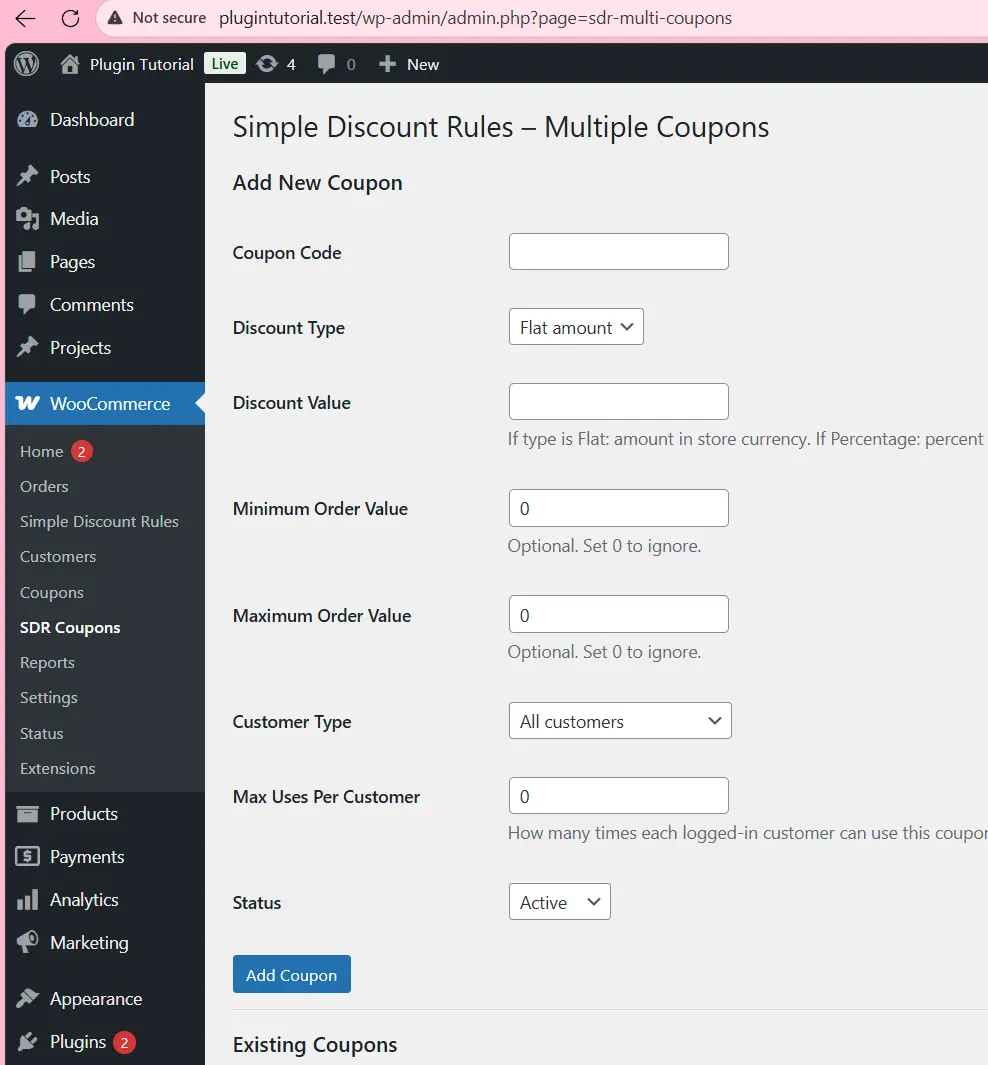
1.2. Add a field to the “Add New Coupon” form
In `sdr_render_settings_page()`, inside the **ADD NEW COUPON FORM** table, add this row before the “Status” row:
/**
 * Render the plugin settings page (helper message + global toggle).
 */
function sdr_render_settings_page() {

    // Get current values from the options table.
    $current_message = get_option(
        'sdr_checkout_message',
        __( 'Enter your special discount code at checkout to claim the offer.', 'simple-discount-rules' )
    );

    $enable_discount = get_option( 'sdr_enable_discount', 'no' );

    // Show any saved messages (from add_settings_error).
    settings_errors( 'sdr_messages' );
    ?>

    <div class="wrap">
        <h1><?php esc_html_e( 'Simple Discount Rules – Settings', 'simple-discount-rules' ); ?></h1>

        <form method="post" action="">
            <?php wp_nonce_field( 'sdr_save_settings', 'sdr_settings_nonce' ); ?>

            <h2><?php esc_html_e( 'General Message', 'simple-discount-rules' ); ?></h2>

            <table class="form-table" role="presentation">
                <tbody>
                    <tr>
                        <th scope="row">
                            <label for="sdr_checkout_message">
                                <?php esc_html_e( 'Checkout Helper Message', 'simple-discount-rules' ); ?>
                            </label>
                        </th>
                        <td>
                            <textarea
                                name="sdr_checkout_message"
                                id="sdr_checkout_message"
                                rows="4"
                                cols="50"
                                class="large-text"
                            ><?php echo esc_textarea( $current_message ); ?></textarea>
                            <p class="description">
                                <?php esc_html_e( 'Shown near the discount code field on the checkout page. You can use it to explain the offer or conditions.', 'simple-discount-rules' ); ?>
                            </p>
                        </td>
                    </tr>
                </tbody>
            </table>

            <h2><?php esc_html_e( 'Global Discount Toggle', 'simple-discount-rules' ); ?></h2>

            <table class="form-table" role="presentation">
                <tbody>
                    <tr>
                        <th scope="row">
                            <?php esc_html_e( 'Enable All Discounts', 'simple-discount-rules' ); ?>
                        </th>
                        <td>
                            <label>
                                <input
                                    type="checkbox"
                                    name="sdr_enable_discount"
                                    value="yes"
                                    <?php checked( $enable_discount, 'yes' ); ?>
                                />
                                <?php esc_html_e( 'Enable all Simple Discount Rules coupons.', 'simple-discount-rules' ); ?>
                            </label>

                            <p class="description">
                                <?php esc_html_e( 'Uncheck to temporarily disable all custom discount coupons, even if they are marked as active.', 'simple-discount-rules' ); ?>
                            </p>
                        </td>
                    </tr>
                </tbody>
            </table>

            <?php submit_button( __( 'Save Changes', 'simple-discount-rules' ), 'primary', 'sdr_settings_submit' ); ?>

        </form>
    </div>

    <?php
}
1.3. Show the the coupon list
In the **Existing Coupons** table header, add a new column:
/* ----------------------------------------------------------
   11. APPLY MULTIPLE COUPON RULES (REPLACES OLD SINGLE-COUPON LOGIC)
---------------------------------------------------------- */
/**
 * Apply a discount when a matching active coupon rule is entered.
 * Uses:
 *  - sdr_enable_discount (global ON/OFF)
 *  - sdr_coupons (array of rule arrays)
 *  - Session key sdr_coupon_code (captured from checkout field)
 */
function sdr_apply_multi_coupon( $cart ) {

    if ( ! sdr_is_woocommerce_active() ) {
        return;
    }

    // Don't run in admin (except AJAX used by WC).
    if ( is_admin() && ! defined( 'DOING_AJAX' ) ) {
        return;
    }

    // Global toggle.
    $enabled = get_option( 'sdr_enable_discount', 'no' );
    if ( 'yes' !== $enabled ) {
        return;
    }

    // Get entered code from session.
    $entered_code = '';
    if ( class_exists( 'WC' ) && WC()->session ) {
        $entered_code = WC()->session->get( 'sdr_coupon_code', '' );
    }

    if ( empty( $entered_code ) ) {
        return; // no code entered
    }

    // Load all coupon rules.
    $coupons = sdr_get_all_coupons();
    if ( empty( $coupons ) ) {
        if ( isset( $_POST['sdr_coupon_code'] ) ) {
            wc_add_notice( __( 'The discount code you entered is not valid.', 'simple-discount-rules' ), 'error' );
        }
        return;
    }

    // Find matching ACTIVE coupon (case-insensitive).
    $rule = false;
    foreach ( $coupons as $c ) {
        if (
            isset( $c['code'], $c['status'] ) &&
            0 === strcasecmp( $entered_code, $c['code'] ) &&
            'active' === $c['status']
        ) {
            $rule = $c;
            break;
        }
    }

    $just_submitted = isset( $_POST['sdr_coupon_code'] ); // For showing notices only once.

    if ( ! $rule ) {
        if ( $just_submitted ) {
            wc_add_notice(
                __( 'The discount code you entered is not valid or is inactive.', 'simple-discount-rules' ),
                'error'
            );
        }
        return;
    }

    // Normalize rule values.
    $discount_type = isset( $rule['discount_type'] ) ? $rule['discount_type'] : 'flat';
    $discount_val  = isset( $rule['value'] ) ? floatval( $rule['value'] ) : 0;
    $min_order     = isset( $rule['min'] ) ? floatval( $rule['min'] ) : 0;
    $max_order     = isset( $rule['max'] ) ? floatval( $rule['max'] ) : 0;
    $customer_type = isset( $rule['customer_type'] ) ? $rule['customer_type'] : 'any';
    $max_uses_per_customer = isset( $rule['max_uses_per_customer'] ) ? intval( $rule['max_uses_per_customer'] ) : 0;
    $coupon_code_label = isset( $rule['code'] ) ? $rule['code'] : '';

    if ( $discount_val <= 0 ) { return; } $cart_subtotal = floatval( $cart->get_subtotal() );

    // Min order check.
    if ( $min_order > 0 && $cart_subtotal < $min_order ) { if ( $just_submitted ) { $msg = sprintf( __( 'This discount is only valid for orders of at least %s.', 'simple-discount-rules' ), wc_price( $min_order ) ); wc_add_notice( $msg, 'error' ); } return; } // Max order check. if ( $max_order > 0 && $cart_subtotal > $max_order ) {
        if ( $just_submitted ) {
            $msg = sprintf(
                __( 'This discount is only valid for orders up to %s.', 'simple-discount-rules' ),
                wc_price( $max_order )
            );
            wc_add_notice( $msg, 'error' );
        }
        return;
    }

    // Customer eligibility (any / new / existing).
    list( $eligible, $error_message ) = sdr_is_customer_eligible( $customer_type );
    if ( ! $eligible ) {
        if ( $just_submitted && ! empty( $error_message ) ) {
            wc_add_notice( $error_message, 'error' );
        }
        return;
    }

    // Enforce per-customer usage limit (if set).
    if ( $max_uses_per_customer > 0 ) {

        $user_id = get_current_user_id();

        // Require login so we can enforce usage per user.
        if ( ! $user_id ) {
            if ( $just_submitted ) {
                wc_add_notice( __( 'Please log in to use this discount.', 'simple-discount-rules' ), 'error' );
            }
            return;
        }

        $already_used = sdr_get_user_coupon_usage( $user_id, $coupon_code_label );

        if ( $already_used >= $max_uses_per_customer ) {
            if ( $just_submitted ) {
                wc_add_notice( __( 'You have already used this discount the maximum number of times.', 'simple-discount-rules' ), 'error' );
            }
            return;
        }
    }

    // Calculate discount.
    $discount = 0.0;

    if ( 'flat' === $discount_type ) {
        $discount = min( $discount_val, $cart_subtotal );
    } elseif ( 'percentage' === $discount_type ) {
        if ( $discount_val > 0 ) {
            $discount = ( $cart_subtotal * $discount_val ) / 100;
            if ( $discount > $cart_subtotal ) {
                $discount = $cart_subtotal;
            }
        }
    } else {
        // Unknown type, do nothing.
        return;
    }

    if ( $discount <= 0 ) { return; } // Build label that reflects the type. if ( 'percentage' === $discount_type ) { $label = sprintf( /* translators: 1: coupon code, 2: discount percentage */ __( 'Special Discount (%1$s – %2$s%%)', 'simple-discount-rules' ), esc_html( $coupon_code_label ), esc_html( $discount_val ) ); } else { $label = sprintf( /* translators: %s: coupon code */ __( 'Special Discount (%s)', 'simple-discount-rules' ), esc_html( $coupon_code_label ) ); } // Add a negative fee (discount) to the cart. $cart->add_fee( $label, - $discount ); // Negative value = discount.

    // Show success notice only when code was just submitted.
    if ( $just_submitted ) {
        if ( 'percentage' === $discount_type ) {
            $notice = sprintf(
                __( 'Your %s%% discount has been applied!', 'simple-discount-rules' ),
                esc_html( $discount_val )
            );
        } else {
            $notice = __( 'Your special discount has been applied!', 'simple-discount-rules' );
        }
        wc_add_notice( $notice, 'success' );
    }
}
add_action( 'woocommerce_cart_calculate_fees', 'sdr_apply_multi_coupon', 20, 1 );
Test Scenarios:
🧪 Scenario A – One-Time Welcome Coupon
Create Coupon Settings
-
Code:
WELCOME10 -
Discount Type: Percentage
-
Value:
10% -
Minimum Order Amount: ₹1000
-
Customer Type: New users only
-
Max Uses Per Customer:
1 - Status: Active
How to Test
Log in as a new test user and place an order using WELCOME10.
- Discount should apply.
- After order completion, the user’s usage count becomes 1.
Place a second order using the same code.
- The plugin should block it with the message:
“You have already used this discount the maximum number of times.” - No discount should be applied.
🧪 Scenario B – Three-Time VIP Coupon
Create Coupon Settings
-
Code:
VIP50 -
Type: Percentage
-
Value:
50% -
Customer Type: Existing customers (optional)
-
Max Uses Per Customer:
3 -
Status: Active
How to Test
For any logged-in user:
-
Apply the coupon in three separate completed orders → Discount should work each time.
-
Attempt to use it a fourth time → The system should block it and display:
“You have already used this discount the maximum number of times.”
🧪 Scenario C – Unlimited Usage Coupon
Create Coupon Settings
-
Code:
SAVE5 -
Max Uses Per Customer:
0or leave blank -
This means unlimited usage allowed (as long as other rules match).
Use it any number of times → The discount should always apply.
✨ Quick Recap of What You Built
In this chapter, you improved your WooCommerce discount rules plugin by adding per-user usage limits. You implemented:
✔ Extended coupon data:
-
Added max_uses_per_customer to each coupon.
✔ Admin Panel Enhancements:
-
New field in “Add Coupon” form
-
Displayed in the coupon list
✔ User-Based Tracking:
-
Stored each user’s coupon usage in
user_meta.
✔ Order Integration:
-
Saved the applied coupon inside each WooCommerce order.
-
Incremented usage when the order reached Completed status.
✔ Checkout Validation:
-
Blocked discounts exceeding the allowed limit.
-
Displayed helpful error messages to the customer.
🎉 Final Result
Your plugin now supports a realistic and commonly used rule:
“WELCOME10 provides 10% off, valid only for new customers, one time per customer, and only on orders above ₹1000.”
Perfect for real-world eCommerce setups and fully customizable for any coupon strategy.