Helloscheduling.com – Employee Scheduling Made Easy

by | Jul 29, 2012 | Reviews | 0 comments

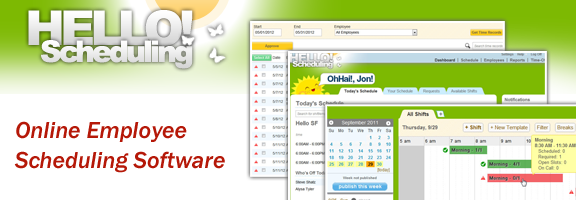
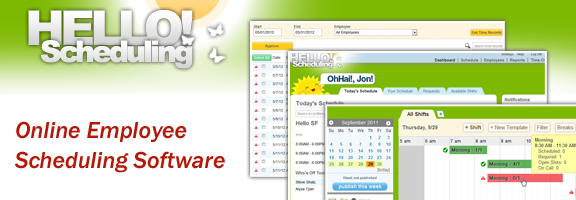
Hello Scheduling is employee scheduling software that was released commercially in September 2011, after 9 months in beta. It is regularly being updated to suit the needs of its customers to offer better features, as it strengthens its place in the strong competition in the market. While it does lack a complete mobile app, as of this review, the app is slated to be released in 3 weeks (August 2012). Hello Scheduling releases new features every 2 weeks.

This webapp is best suited for businesses having more than twenty employees and is highly functional for those with around or over 150 staff members. It is very easy and simple to use and can be accessed by all the employees through email logins if created. With this, your employees can swap shifts, request time off, see schedules, bid for vacant shifts, and even break times from a mobile device or a computer having an internet browser. It works for all kinds of businesses, ranging from clothing boutiques to car washes to restaurants to rehab centers.

There is an excellent quick set-up wizard, an option to import employee lists with help of your support staff and online schedule postings to name some really good features of this software. Set up takes just about fifteen minutes, which is considerably fast compared to others. You are provided template options from the beginning. You can also export data using this app.

Hello Scheduling is great at optimizing staff resources for you. It does not give you too much flexibility though. There is an auto-scheduler, where you have to choose the shifts to be filled with the positions and skills of those who are to fill it and the rest will be done for you. Changes to the schedule are quick and easily made both by you and by other managers.

You can plan meal times and breaks for your staff easily. To define multiple locations and departments is a little more complicated; however, you can create as many departments as you would like. You have to pay for this software monthly and the payment increases with the number of employees in your company. You can also save your own time during work timings by letting employees log in, select their work timings and request for swapping of shifts. They can also bid for vacant shifts declared by you. You have the full control and every change needs your approval in the end.

The scheduling data can be found and organized in many ways with Hello Scheduling. It can store employee information like pay rates, email addresses, phone numbers and addresses. This information can be accessed with a few mouse clicks only. Also, daily, monthly and weekly schedules can be viewed, printed and posted online. There is a rare feature called payroll reporting, which tells you the cost of each shift. This software is very easy to use with its modern and clean interface, auto scheduler and easy set-up wizard. Other great tools are labor cost calculator, shift templates and schedule conflict warnings. The help and support is very useful too.

Good: Excellent help options, payroll listing and easy to use

Bad: Lack of features like a mobile app, although that will be released soon

Visit this site at http://www.helloscheduling.com/ and post your reviews as comments.
Article Summary by AI

HelloScheduling.com simplifies employee scheduling for businesses with 20+ staff. Key features include quick setup, shift swapping, and break planning. While lacking a full mobile app, regular updates enhance functionality. Ideal for mid-sized companies seeking efficiency! #EmployeeScheduling

YOU MAY ALSO LIKE THESE

What Makes a Great Word Puzzle Game? Discover Word Scrapes

What Makes a Great Word Puzzle Game? Discover Word Scrapes

There are many word puzzle games available for mobile devices. Some focus on completing grids, others challenge players to discover hidden words, and some introduce time limits or competitive activities. With so many options, what makes a word puzzle game enjoyable? A...

Top 5 Knowledge Base and Help Center Software in 2026

Top 5 Knowledge Base and Help Center Software in 2026

The same handful of questions tend to reach a customer support team over and over, and a genuinely well-built knowledge base solves this by letting customers find clear, searchable answers themselves before ever needing to open a support ticket at all. Modern...

Top 5 Digital Signage and Screen Management Software in 2026

Top 5 Digital Signage and Screen Management Software in 2026

Digital signage software solves a genuinely practical business problem: managing content across one or dozens of displays remotely, updating a menu board, a retail promotion, or a corporate dashboard without ever needing to physically visit each screen. The category...

Renue Gives Mobile Car Detailing the Premium Experience It Deserves

Renue Gives Mobile Car Detailing the Premium Experience It Deserves

Having a professional detailer come directly to your home is already convenient, but convenience alone does not always make for a great experience. Customers also want to know who is coming, what they are paying and when the service will begin. Renue brings all of...

Top 5 AI Website Builder Web Apps in 2026

Top 5 AI Website Builder Web Apps in 2026

AI website builders have moved well past the novelty phase of generating a generic template from a one-line prompt, and 2026's leading platforms now split fairly cleanly into a few distinct lanes: design-first tools built for visual polish, all-in-one business...

Best Web Apps for Building Internal Company Wikis in 2026

Best Web Apps for Building Internal Company Wikis in 2026

Every growing company eventually hits the point where institutional knowledge, how a process actually works, where a specific decision came from, why a system was built a certain way, lives only in a few people's heads, creating genuine risk when those people are...

Top 5 Cloud Document Management Web Apps for Business in 2026

Top 5 Cloud Document Management Web Apps for Business in 2026

Important business documents scattered across individual email attachments, local hard drives, and a handful of forgotten folders make finding a specific file genuinely frustrating right when it's needed most, often during a client call or an urgent deadline. Cloud...

Top 5 Online Course and LMS Platforms for Creators in 2026

Top 5 Online Course and LMS Platforms for Creators in 2026

Turning genuine expertise into a structured, sellable online course used to require piecing together separate video hosting, payment processing, and student progress tracking tools manually, a genuinely significant technical barrier for creators who just wanted to...

Top 5 Inventory Management Web Apps for Small Business in 2026

Top 5 Inventory Management Web Apps for Small Business in 2026

Tracking inventory through a spreadsheet or, worse, memory alone works fine for a business with a handful of products, but it breaks down quickly once a growing catalog spans multiple sales channels, a physical location, and an online store simultaneously, each...

Top 5 Helpdesk and Customer Support Web Apps in 2026

Top 5 Helpdesk and Customer Support Web Apps in 2026

A shared email inbox works fine for customer support right up until multiple team members start replying to the same message, or a customer's history gets lost across a dozen scattered email threads with no clear record of what was already promised. Helpdesk and...