
When the app Spotify was released, there was huge awe and gasps from everywhere for the app that it is. It is a complete music web app that stores your playlists online and plays your favorites on-demand. This is due to constant online streaming which makes it less dependent on your PC. These music files have no delay while playing since they don’t occupy any space on the hard disk and are streamed from the internet directly. Spotify had a single inability of transferring files from app to PC or Mobile due to its privacy policy. Now this activity is possible with the advent of M2S for Spotify.
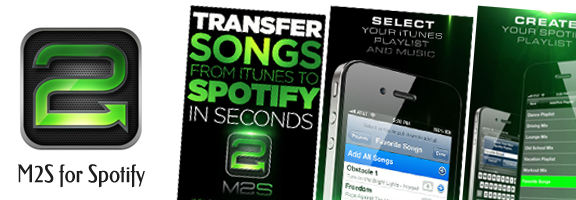
M2S for Spotify enables the transfer of music files to and from your PC or Mobile. It is more specifically an iOS app that adapts to other OSs as well. Developed by Neuron Industries Inc. M2S for Spotify helps enable transfer of music files from iTunes to Spotify directly at the speed of lightning. Since Spotify streams songs from the internet, there is no actual / physical transfer of files happening. M2S for Spotify needs to transfer just the names and other info about the songs and then let Spotify connect to the actual song streaming from the web.
Step by step use of M2S for Spotify
- Open the app and click on the logo for starting the app. This app directly opens the your playlists in iTunes
- You can select varied songs from several playlists or from just one playlist and say done
- The app prompts you for the name of the playlist in Spotify after which it transfers the songs playlist to Spotify and is available on your PC or smartphone
- You can listen to your favorite songs on the go now
Functional Highlights
- Inbuilt integration with iTunes for convenient song selection and management
- Fastest song transfer rate up to 10 songs per second
- M2S for Spotify is optimized for iOS 5 and above
- Each playlist can hold up to 5000 songs
- Implementation Cloud concept without a cloud. Just the world wide web is used.
Pros
The concept is an optimal one, one that cuts down redundant usage of memory space. The actual storage of the songs is in the www server and not on your devices. What these devices actually store are the pointers to these songs. This ensures that you are connected to your playlist wherever you are.
Cons
M2S for Spotify is highly dependent on internet connection. Also it requires Spotify premium account which is $9.99 per month. This app is priced at an additional $1.99 normally, but now Neuron Industries Inc is offering it for $0.99 as for a limited period of time.
Summary
Spotify is the main app and M2S for Spotify is app within an app (Spotify) and is not an independent app. But it reduces the need to have several music apps. Just one music app namely Spotify is sufficient to all your music file related activities. So go on and get M2S for Spotify, for your iDevice, for a whole new musical experience.
Worth Having Application – Download the Application