PandaDoc: Going paperless made convenient and easy

by | Apr 13, 2015 | Reviews | 0 comments

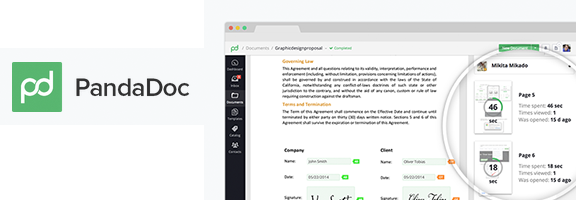
panda_doc_webappraterAll of us know very well how paper work can get very messy indeed. At the same time, it cannot be avoided whatsoever. Wouldn’t it be nice to have a way to manage your paper work paperlessly? Eliminate all the mess while also ensuring that everything is safe in one place. PandaDoc helps you do exactly this. This web and mobile platform has been designed to help people create, sign and send digital documents from any device, while also ensuring security.

You can store digital versions of all your important documents without any hassles using this app. It becomes convenient to send or receive documents to people across the globe, irrespective of how large or small the distance in between is. It is compatible with a range of formats including docx, doc, rtf and pdf. Also, it connects with Google Drive and Dropbox, allowing you to integrate everything in one place. It can be accessed form anywhere on a web browser, an iOS device or even an Android device.

Besides just the main functionality, this app has a number of add-on features that make it worthwhile. To begin with, it is highly secure. It keeps track of all accesses to your documents through an audit trail which includes IP address, signature certificates, user details and each transaction, ensuring that you are well informed about all your digital documentation. It has visual media capabilities, tracking features and an easy-to-use drag and drop interface. Additionally, as a user, you have access to a huge database of templates for documents. These have been designed with the help of numerous professionals including accountants, web designers, lawyers and more. All these make the app simpler to use for you.

This app is suited for both businesses and individual users. It scores highly in terms of deign. It has a friendly yet professional interface that is not distracting to the user. Clutter has been minimised, while keeping the information in the app optimal. The learning curve for the app is almost non-existent. Even someone who is completely new to the app can figure it out in no time at all.

In order to get started with this app, you have to first create an account with it. This requires you to input your email address, first name and last name and a password. Additionally, you can sign in via your Google account if you wish to eliminate this sign up. There is a free version of this app that allows you to work with three documents per month. The Professional plan is suited for individuals and costs $9.99 per month, allowing access to up to 30 documents. The Business plan costs $19.99 per month, allowing access to unlimited documents and adding phone support to the equation.

PandaDoc is an app that is suited for anyone who works with a lot of documents. You can keep all your documents in one place and access them from anywhere through this app. It not only reduces paper waste but also makes things more convenient for you. With its unique features and excellent design, this app has carved its niche in the market.

Good: Audit trail, access to templates

Bad: None

Worth Having App –  Get the App now

Article Summary by AI

PandaDoc simplifies going paperless! Create, sign, and send documents securely from any device. With seamless integrations, templates, and robust tracking, it’s perfect for businesses and individuals alike. Enjoy a clutter-free interface that makes document management a breeze!

YOU MAY ALSO LIKE THESE

Top 5 Cloud Document Management Web Apps for Business in 2026

Top 5 Cloud Document Management Web Apps for Business in 2026

Important business documents scattered across individual email attachments, local hard drives, and a handful of forgotten folders make finding a specific file genuinely frustrating right when it's needed most, often during a client call or an urgent deadline. Cloud...

Top 5 Online Course and LMS Platforms for Creators in 2026

Top 5 Online Course and LMS Platforms for Creators in 2026

Turning genuine expertise into a structured, sellable online course used to require piecing together separate video hosting, payment processing, and student progress tracking tools manually, a genuinely significant technical barrier for creators who just wanted to...

Top 5 Inventory Management Web Apps for Small Business in 2026

Top 5 Inventory Management Web Apps for Small Business in 2026

Tracking inventory through a spreadsheet or, worse, memory alone works fine for a business with a handful of products, but it breaks down quickly once a growing catalog spans multiple sales channels, a physical location, and an online store simultaneously, each...

Top 5 Helpdesk and Customer Support Web Apps in 2026

Top 5 Helpdesk and Customer Support Web Apps in 2026

A shared email inbox works fine for customer support right up until multiple team members start replying to the same message, or a customer's history gets lost across a dozen scattered email threads with no clear record of what was already promised. Helpdesk and...

Top 5 Email Marketing Web Apps for Small Businesses in 2026

Top 5 Email Marketing Web Apps for Small Businesses in 2026

Despite years of predictions that email marketing would fade in favor of social media, it consistently remains one of the highest-return marketing channels available to small businesses, largely because it reaches people in a space they actually check regularly rather...

Top 5 Payroll and HR Web Apps for Small Teams in 2026

Top 5 Payroll and HR Web Apps for Small Teams in 2026

Payroll is one of those business tasks where a small mistake carries an outsized cost, whether that's a missed tax filing deadline or an employee paid incorrectly two pay periods in a row. Manually tracking hours, deductions, and benefits in a spreadsheet works right...

Top 5 Customer Support Helpdesk Web Apps Compared in 2026

Top 5 Customer Support Helpdesk Web Apps Compared in 2026

Once a business grows past a handful of customers, a shared inbox stops being enough to manage support requests, tickets get missed, response times slip, and nobody has a clear view of what's actually outstanding across the whole team. A proper helpdesk web app fixes...

Best Scheduling and Booking Web Apps for Businesses in 2026

Best Scheduling and Booking Web Apps for Businesses in 2026

The back-and-forth of finding a mutually available meeting time still eats up more time than it should for a huge number of businesses, especially client-facing ones juggling appointments across multiple staff members or service types. A good scheduling web app...

Top 5 No-Code Website Builders in 2026

Top 5 No-Code Website Builders in 2026

No-code website builders have closed the gap with custom-coded sites so significantly that most small businesses and freelancers genuinely no longer need a developer just to launch a professional-looking website. The real differences between the top platforms now come...

Best Invoicing and Billing Web Apps for Freelancers in 2026

Best Invoicing and Billing Web Apps for Freelancers in 2026

Chasing late payments is one of the most draining parts of freelancing, and a surprising amount of that friction comes down to sending invoices that look unprofessional, lack clear payment terms, or make it genuinely inconvenient for a client to actually pay. The...

Top 5 Email Marketing Platforms Compared for SaaS in 2026

Top 5 Email Marketing Platforms Compared for SaaS in 2026

Email remains one of the highest-return marketing channels a SaaS company has, but only if the platform behind it handles deliverability, automation, and segmentation properly at scale. Picking the wrong tool early on tends to cause real pain later, migrating a large...

Best Email Marketing Web Apps in 2026 Reviewed

Best Email Marketing Web Apps in 2026 Reviewed

Email marketing consistently delivers the highest return on investment of any digital marketing channel in 2026, with industry analyses regularly showing returns of thirty to forty dollars for every dollar invested in well-executed campaigns. The platform you use to...