PDF Reader iOS App – Not Just a Reader !

by | May 19, 2014 | Reviews | 0 comments

pdf

An app that can handle all your PDF documents is a must in each Smartphone. That’s because PDF is the most widely accepted format and whether it’s a resume or any other official document, all documents are generally in an editable format. So to change them back to PDF is a must before you can forward them forward. You can find many such PDF related Software in the market and today we have another one of them. Let’s see how many points do this one score on our meter!

I am talking about the iOS app called PDF Reader that has been developed by Kdan Mobile Software LTD. The app is compatible with iPhone, iPod touch and iPad and requires iOS 5.0 or any later version of the OS. This app has also been optimized for iPhone 5.

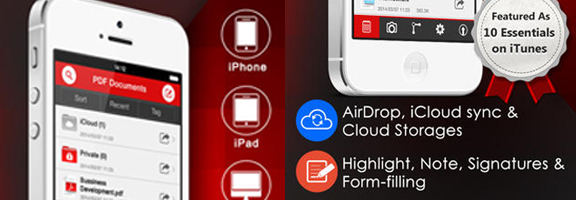
PDF Reader covers it all from scanning an image and converting it to PDF to reading the PDF documents and managing them all alongside. Let’s discuss them one by one. When it comes to scanning documents, you can either import the image from your photo library or click a new one. Before converting it to PDF, you can edit it as well which can be adjusting the exposure, cropping or changing it to B&W.

Let your document be an assignment and your friends want it as well. So as soon as the document is ready, you can share it with your friends via cloud services such as Dropbox, Google Docs, Google Drive, Box, etc which can also be used for backing up your documents.

PDF Reader supports all annotation features so that you can enjoy the same freedom as you enjoy with your handwritten notes. You can highlight text, fill up PDF forms as well as sign them, add text box anywhere on the page and much more.

The UI of this app is another commendable feature that makes it such an easy to use app. You can create new folders and add files to them and there are so many different formats compatible with this one that you just can’t count. You can sort different files according to tags which will later on help you to find them. You can also change the settings for scanner such as the page size, margins, etc. When you open a document, you can see all the different pages and change them individually as well.

Overall, PDF Reader is an app that has it all. It isn’t having that one distinguish feature because it has everything that you can expect from such an app. But all of that comes at a cost. Though the app is available for free in the App Store, all of the features we’ve discussed above are available only in the Premium version which is available for $2.99. So you can first try the free app and if you like it which you probably will, then you can go for the Premium one!

Pros: intuitive UI; tag documents for easy search; scan images and convert to PDF; share via Cloud services and AirDrop; full annotation features; freehand signature; free version available.

Cons: none.

Worth Having Application –  Download the Application
Article Summary by AI

PDF Reader by Kdan Mobile is a versatile iOS app that scans, edits, and shares PDFs effortlessly. With robust annotation features, a user-friendly interface, and cloud integration, it’s perfect for students and professionals alike. Transform your PDFs with ease! 📄✨ #PDFReader #iOSApp

YOU MAY ALSO LIKE THESE

Top 5 Animal Battle Games with Fantasy Creatures

Top 5 Animal Battle Games with Fantasy Creatures

Top 5 Animal Battle Games with Fantasy Creatures Animal battle games are fun because they combine two strong ideas: caring for creatures and using them in exciting battles. Players enjoy collecting rare animals, training them, unlocking powers, and building teams....

Cozy Games: Why Social Farming Games Are Trending in 2026

Cozy Games: Why Social Farming Games Are Trending in 2026

Cozy games are simple, relaxing games that make players feel calm and comfortable. Instead of focusing on violence, speed, or heavy competition, these games focus on farming, decorating, crafting, fishing, relationships, and slow progress. In 2026, cozy social farming...

Stripo: The Email Builder That Fortune 100 Companies Trust

Stripo: The Email Builder That Fortune 100 Companies Trust

If you've ever spent hours wrestling with an email template — tweaking HTML, fighting broken layouts, or paying a developer for every minor change — you'll understand why a dedicated email builder is a game-changer. Stripo promises to solve all of that. With over 1.6...

Kadaza : The Best Visual Start Page for Your Browser?

Kadaza : The Best Visual Start Page for Your Browser?

If you spend hours browsing the internet every day, you know how frustrating it is to waste time hunting for your favorite websites. That's exactly the problem Kadaza was built to solve. Launched in 2008, Kadaza is a free visual browser start page that turns your...

Transforming HR for the Modern Enterprise

Transforming HR for the Modern Enterprise

Introducing Spine HR Suite: Your All-in-One HR & Payroll Web Application Platform In today’s fast-paced business landscape, HR departments need more than spreadsheets and manual processes. They need a robust, intelligent HR platform that streamlines every stage of...
DentalPro Cloud: Transforming Dental Practice Management in 2026

DentalPro Cloud: Transforming Dental Practice Management in 2026

The dental industry continues evolving with technology, and practice management software has become essential for modern clinics. DentalPro Cloud emerges as a comprehensive solution addressing the unique challenges dental professionals face daily. Understanding Modern...

Ano ang Best Pinoy Tongits App ng 2025?

Ano ang Best Pinoy Tongits App ng 2025?

Kapag tinanong kung ano ang best Pinoy Tongits app ng 2025, nakadepende ito sa uri ng manlalaro na ikaw. Ang Tongits ay higit pa sa simpleng laro ng baraha sa Pilipinas. Isa itong kultura at isang paraan ng pakikipag-ugnayan na makikita sa mga kusina, tindahan, at...