Share and explore with WiFly Pro : iOS Application

by | Jun 12, 2013 | Reviews | 0 comments

wifly

If document sharing through Smartphone is what bothers you, then you have the right solution on iTunes. WiFly Pro is an application squeezed in the iTunes store from where it can be found and bought by the users. It is actually a beneficial unclouded service which lets you share and transfer the desired documents and other files between computer and mobile devices through a wireless network.

WiFly Pro is a simple application and easy to control which makes it very much user friendly. If you were looking for something that connects your PC and iOS device, then this one does that. This particular application lets you to access the pc through your iOS device and each type of files is accessible with this application. Moreover, there is no need to have any cloud service or internet connection to handle this application. If you want to do some modifications to the songs or wallpapers in your mobile devices you can transfer them by WiFly Pro to the pc and edit them as your requirements. It is a both sided communication.

Features:

  • The transferred files can be accessed with any application on your iOS device.
  • Supporting devices include Mac, iPod, iPhone, iPad etc.
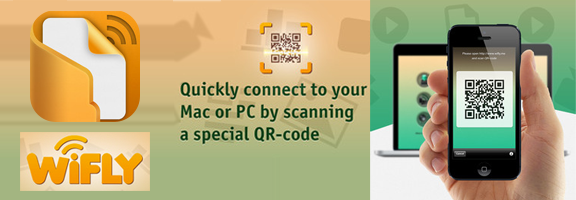
  • The device can be connected with the pc or MAC by scanning a QR code.
  • Severe problems like right clicking and selecting files or the uses of the download manager can be avoided by this particular application introduced by Online Publishing Partners Limited Liability Company.
  • The transfer is much safe and done with an ease for the users.
  • Simply scans QR code from http://wifly.me to connect the phone.
  • The preview of the wallpapers and the clicked pictures are available in the browser.
  • The entire folder can be downloaded to your computer.
  • The problems of connecting the USB cables in between the computer and your phone is now have been solved because this application provides you the smooth service to transfer the files wirelessly.
  • Multiple uploads and numerous files can be easily dragged and dropped to WiFly.
  • You require a LAN or WLAN access on both the device that you are going to connect with the app.
  • It is a newly launched application with the version 1.0 dated 29th May, 2013.
  • The app requires iOS 5.0 or later.

Summary: WiFly Pro is an elegant application designed with some extraordinary features as well as new interface. The extension of the benefits of this app now touched the flight of the clouds even without the Cloud service and internet feature which makes it delicate to the users.

Good: This application is proficient with any kind off iOS devices which is really good and it has achieved much of its supports. It has got some great ratings from the users and nice reviews about it. As a newly launched application we can mark this as excellent one and hope this can serve very well to the users.

Bad: Except a few criticisms on its privacy policy and security it has not much negative feedback.

Worth Having Application – Download the Application

Article Summary by AI

WiFly Pro simplifies document sharing between iOS devices and PCs without cloud or internet. Easy to use, it lets users access, transfer, and modify files wirelessly via QR code. Ideal for anyone seeking hassle-free file management. Say goodbye to USB cables! #WiFlyPro

YOU MAY ALSO LIKE THESE

Top 5 Customer Support Helpdesk Web Apps Compared in 2026

Top 5 Customer Support Helpdesk Web Apps Compared in 2026

Once a business grows past a handful of customers, a shared inbox stops being enough to manage support requests, tickets get missed, response times slip, and nobody has a clear view of what's actually outstanding across the whole team. A proper helpdesk web app fixes...

Best Scheduling and Booking Web Apps for Businesses in 2026

Best Scheduling and Booking Web Apps for Businesses in 2026

The back-and-forth of finding a mutually available meeting time still eats up more time than it should for a huge number of businesses, especially client-facing ones juggling appointments across multiple staff members or service types. A good scheduling web app...

Top 5 No-Code Website Builders in 2026

Top 5 No-Code Website Builders in 2026

No-code website builders have closed the gap with custom-coded sites so significantly that most small businesses and freelancers genuinely no longer need a developer just to launch a professional-looking website. The real differences between the top platforms now come...

Best Invoicing and Billing Web Apps for Freelancers in 2026

Best Invoicing and Billing Web Apps for Freelancers in 2026

Chasing late payments is one of the most draining parts of freelancing, and a surprising amount of that friction comes down to sending invoices that look unprofessional, lack clear payment terms, or make it genuinely inconvenient for a client to actually pay. The...

Top 5 Email Marketing Platforms Compared for SaaS in 2026

Top 5 Email Marketing Platforms Compared for SaaS in 2026

Email remains one of the highest-return marketing channels a SaaS company has, but only if the platform behind it handles deliverability, automation, and segmentation properly at scale. Picking the wrong tool early on tends to cause real pain later, migrating a large...

Best Email Marketing Web Apps in 2026 Reviewed

Best Email Marketing Web Apps in 2026 Reviewed

Email marketing consistently delivers the highest return on investment of any digital marketing channel in 2026, with industry analyses regularly showing returns of thirty to forty dollars for every dollar invested in well-executed campaigns. The platform you use to...

Best CRM Web Apps for Small Business in 2026

Best CRM Web Apps for Small Business in 2026

A CRM - Customer Relationship Management tool - is the single highest-leverage software investment most small businesses make in 2026. Without one, client information lives across email threads, spreadsheets, sticky notes, and individual team members' memories,...

How to Make Money with Web Apps in 2026

How to Make Money with Web Apps in 2026

Building a web app is only half the equation. Choosing the right monetisation model in 2026 determines whether it becomes a profitable business or a passion project that costs you money to maintain. Many technically excellent products fail not because of what they...

Top 5 Web App Dev Tools for Startups 2026

Top 5 Web App Dev Tools for Startups 2026

Speed matters most for startups. The right development tools in 2026 can take a web app from idea to production in days rather than months. The wrong tools create technical debt, deployment friction, and team onboarding costs that slow you down at exactly the moment...