Chapter 6: Add Customer Constraints – New vs Existing Customers
Real campaigns often say things like:
- “10% OFF for new customers only”
- “Flat ₹200 OFF for returning customers”
In this chapter we’ll:
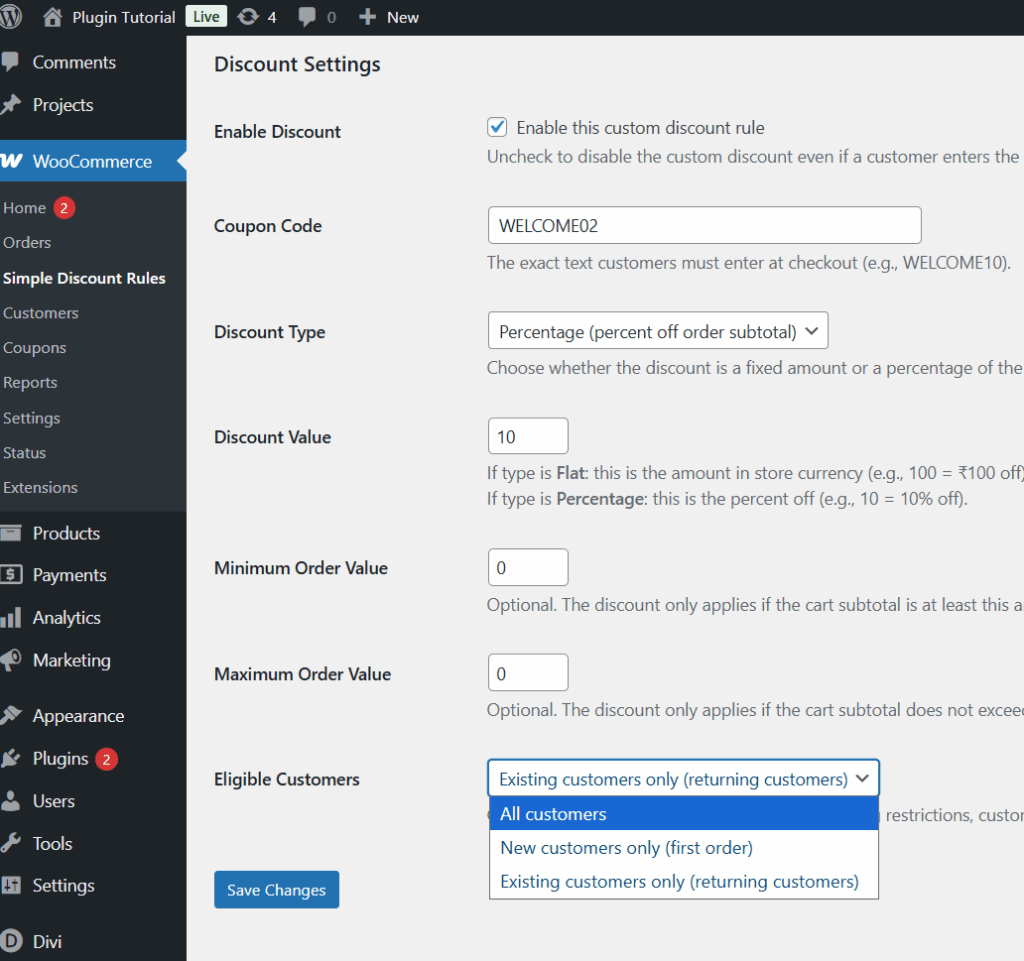
- Add a setting in admin to choose who can use the coupon:
- All customers
- New customers only
- Existing customers only
- Update our discount logic to:
- Detect if the user is logged in
- Count how many orders they already have
- Allow or block the discount accordingly
We’ll use WooCommerce’s helper wc_get_customer_order_count() for simplicity.
1. Add “Eligible Customer Type” Setting in Admin
We’ll store this in a new option:
sdr_customer_type
Allowed values:
- any → All customers (default)
- new → New customers only (no previous orders)
- existing → Existing customers only (has at least one past order)
1.1. Update the form submission handler
Find your sdr_handle_settings_form_submit() in simple-discount-rules.php and replace it with this version that also saves sdr_customer_type:
/**
 * Handle settings form submission.
 */
function sdr_handle_settings_form_submit() {

    // Check if our form was submitted.
    if ( ! isset( $_POST['sdr_settings_submit'] ) ) {
        return;
    }

    // Check nonce for security.
    if ( ! isset( $_POST['sdr_settings_nonce'] ) || ! wp_verify_nonce( $_POST['sdr_settings_nonce'], 'sdr_save_settings' ) ) {
        return;
    }

    // Check capability.
    if ( ! current_user_can( 'manage_woocommerce' ) ) {
        return;
    }

    // Checkout message (optional helper text).
    $message = isset( $_POST['sdr_checkout_message'] )
        ? wp_kses_post( wp_unslash( $_POST['sdr_checkout_message'] ) )
        : '';

    // Enable discount (checkbox).
    $enable_discount = isset( $_POST['sdr_enable_discount'] ) && 'yes' === $_POST['sdr_enable_discount']
        ? 'yes'
        : 'no';

    // Coupon code (simple text).
    $coupon_code = isset( $_POST['sdr_coupon_code'] )
        ? sanitize_text_field( wp_unslash( $_POST['sdr_coupon_code'] ) )
        : '';

    // Discount type: flat or percentage.
    $discount_type = isset( $_POST['sdr_discount_type'] )
        ? sanitize_text_field( wp_unslash( $_POST['sdr_discount_type'] ) )
        : 'flat';

    if ( ! in_array( $discount_type, array( 'flat', 'percentage' ), true ) ) {
        $discount_type = 'flat';
    }

    // Discount value (amount or percentage).
    $discount_value_raw = isset( $_POST['sdr_flat_discount_amount'] )
        ? wp_unslash( $_POST['sdr_flat_discount_amount'] )
        : '';
    $discount_value     = floatval( $discount_value_raw );
    if ( $discount_value < 0 ) {
        $discount_value = 0;
    }

    // Minimum order amount.
    $min_order_raw = isset( $_POST['sdr_min_order_amount'] )
        ? wp_unslash( $_POST['sdr_min_order_amount'] )
        : '';
    $min_order     = floatval( $min_order_raw );
    if ( $min_order < 0 ) {
        $min_order = 0;
    }

    // Maximum order amount.
    $max_order_raw = isset( $_POST['sdr_max_order_amount'] )
        ? wp_unslash( $_POST['sdr_max_order_amount'] )
        : '';
    $max_order     = floatval( $max_order_raw );
    if ( $max_order < 0 ) {
        $max_order = 0;
    }

    // Customer type: any / new / existing.
    $customer_type = isset( $_POST['sdr_customer_type'] )
        ? sanitize_text_field( wp_unslash( $_POST['sdr_customer_type'] ) )
        : 'any';

    if ( ! in_array( $customer_type, array( 'any', 'new', 'existing' ), true ) ) {
        $customer_type = 'any';
    }

    // Save options.
    update_option( 'sdr_checkout_message', $message );
    update_option( 'sdr_enable_discount', $enable_discount );
    update_option( 'sdr_coupon_code', $coupon_code );
    update_option( 'sdr_discount_type', $discount_type );
    update_option( 'sdr_flat_discount_amount', $discount_value );
    update_option( 'sdr_min_order_amount', $min_order );
    update_option( 'sdr_max_order_amount', $max_order );
    update_option( 'sdr_customer_type', $customer_type );

    // Add a settings updated flag so we can show a notice.
    add_settings_error(
        'sdr_messages',
        'sdr_message',
        __( 'Settings saved.', 'simple-discount-rules' ),
        'updated'
    );
}
add_action( 'admin_init', 'sdr_handle_settings_form_submit' );
1.2. Update the settings page UI
Now we add a dropdown to choose eligible customer type.
Find sdr_render_settings_page() and replace it with this version (note the new “Eligible Customers” row):
<?php
/**
* Render the plugin settings page.
*/
function sdr_render_settings_page() {
// Get current values from the options table.
$current_message = get_option(
'sdr_checkout_message',
__( 'Enter your special discount code at checkout to claim the offer.', 'simple-discount-rules' )
);
$enable_discount = get_option( 'sdr_enable_discount', 'no' );
$coupon_code = get_option( 'sdr_coupon_code', '' );
$discount_type = get_option( 'sdr_discount_type', 'flat' );
$discount_value = get_option( 'sdr_flat_discount_amount', 0 );
$min_order = get_option( 'sdr_min_order_amount', 0 );
$max_order = get_option( 'sdr_max_order_amount', 0 );
$customer_type = get_option( 'sdr_customer_type', 'any' );
// Show any saved messages (from add_settings_error).
settings_errors( 'sdr_messages' );
?>
<div class="wrap">
<h1><?php esc_html_e( 'Simple Discount Rules – Settings', 'simple-discount-rules' ); ?></h1>
<form method="post" action="">
<?php wp_nonce_field( 'sdr_save_settings', 'sdr_settings_nonce' ); ?>
<h2><?php esc_html_e( 'General Message', 'simple-discount-rules' ); ?></h2>
<table class="form-table" role="presentation">
<tbody>
<tr>
<th scope="row">
<label for="sdr_checkout_message">
<?php esc_html_e( 'Checkout Helper Message', 'simple-discount-rules' ); ?>
</label>
</th>
<td>
<textarea
name="sdr_checkout_message"
id="sdr_checkout_message"
rows="4"
cols="50"
class="large-text"
><?php echo esc_textarea( $current_message ); ?></textarea>
<p class="description">
<?php esc_html_e( 'Shown near the discount code field on the checkout page. You can use it to explain the offer or conditions.', 'simple-discount-rules' ); ?>
</p>
</td>
</tr>
</tbody>
</table>
<h2><?php esc_html_e( 'Discount Settings', 'simple-discount-rules' ); ?></h2>
<table class="form-table" role="presentation">
<tbody>
<tr>
<th scope="row">
<?php esc_html_e( 'Enable Discount', 'simple-discount-rules' ); ?>
</th>
<td>
<label>
<input
type="checkbox"
name="sdr_enable_discount"
value="yes"
<?php checked( $enable_discount, 'yes' ); ?>
/>
<?php esc_html_e( 'Enable this custom discount rule', 'simple-discount-rules' ); ?>
</label>
<p class="description">
<?php esc_html_e( 'Uncheck to disable the custom discount even if a customer enters the correct code.', 'simple-discount-rules' ); ?>
</p>
</td>
</tr>
<tr>
<th scope="row">
<label for="sdr_coupon_code">
<?php esc_html_e( 'Coupon Code', 'simple-discount-rules' ); ?>
</label>
</th>
<td>
<input
type="text"
name="sdr_coupon_code"
id="sdr_coupon_code"
value="<?php echo esc_attr( $coupon_code ); ?>"
class="regular-text"
/>
<p class="description">
<?php esc_html_e( 'The exact text customers must enter at checkout (e.g., WELCOME10).', 'simple-discount-rules' ); ?>
</p>
</td>
</tr>
<tr>
<th scope="row">
<label for="sdr_discount_type">
<?php esc_html_e( 'Discount Type', 'simple-discount-rules' ); ?>
</label>
</th>
<td>
<select name="sdr_discount_type" id="sdr_discount_type">
<option value="flat" <?php selected( $discount_type, 'flat' ); ?>>
<?php esc_html_e( 'Flat amount (fixed value off)', 'simple-discount-rules' ); ?>
</option>
<option value="percentage" <?php selected( $discount_type, 'percentage' ); ?>>
<?php esc_html_e( 'Percentage (percent off order subtotal)', 'simple-discount-rules' ); ?>
</option>
</select>
<p class="description">
<?php esc_html_e( 'Choose whether the discount is a fixed amount or a percentage of the cart subtotal.', 'simple-discount-rules' ); ?>
</p>
</td>
</tr>
<tr>
<th scope="row">
<label for="sdr_flat_discount_amount">
<?php esc_html_e( 'Discount Value', 'simple-discount-rules' ); ?>
</label>
</th>
<td>
<input
type="number"
step="0.01"
min="0"
name="sdr_flat_discount_amount"
id="sdr_flat_discount_amount"
value="<?php echo esc_attr( $discount_value ); ?>"
class="small-text"
/>
<p class="description">
<?php echo wp_kses_post(
__(
'If type is <strong>Flat</strong>: this is the amount in store currency (e.g., 100 = ₹100 off).<br>If type is <strong>Percentage</strong>: this is the percent off (e.g., 10 = 10% off).',
'simple-discount-rules'
)
); ?>
</p>
</td>
</tr>
<tr>
<th scope="row">
<label for="sdr_min_order_amount">
<?php esc_html_e( 'Minimum Order Value', 'simple-discount-rules' ); ?>
</label>
</th>
<td>
<input
type="number"
step="0.01"
min="0"
name="sdr_min_order_amount"
id="sdr_min_order_amount"
value="<?php echo esc_attr( $min_order ); ?>"
class="small-text"
/>
<p class="description">
<?php esc_html_e( 'Optional. The discount only applies if the cart subtotal is at least this amount. Set 0 to ignore.', 'simple-discount-rules' ); ?>
</p>
</td>
</tr>
<tr>
<th scope="row">
<label for="sdr_max_order_amount">
<?php esc_html_e( 'Maximum Order Value', 'simple-discount-rules' ); ?>
</label>
</th>
<td>
<input
type="number"
step="0.01"
min="0"
name="sdr_max_order_amount"
id="sdr_max_order_amount"
value="<?php echo esc_attr( $max_order ); ?>"
class="small-text"
/>
<p class="description">
<?php esc_html_e( 'Optional. The discount only applies if the cart subtotal does not exceed this amount. Set 0 to ignore.', 'simple-discount-rules' ); ?>
<</p>
</td>
</tr>
<tr>
<th scope="row">
<label for="sdr_customer_type">
<?php esc_html_e( 'Eligible Customers', 'simple-discount-rules' ); ?>
</label>
</th>
<td>
<select name="sdr_customer_type" id="sdr_customer_type">
<option value="any" <?php selected( $customer_type, 'any' ); ?>>
<?php esc_html_e( 'All customers', 'simple-discount-rules' ); ?>
</option>
<option value="new" <?php selected( $customer_type, 'new' ); ?>>
<?php esc_html_e( 'New customers only (first order)', 'simple-discount-rules' ); ?>
</option>
<option value="existing" <?php selected( $customer_type, 'existing' ); ?>>
<?php esc_html_e( 'Existing customers only (returning customers)', 'simple-discount-rules' ); ?>
</option>
</select>
<p class="description">
<?php esc_html_e( 'Control who can use this discount. For new/existing restrictions, customers must be logged in.', 'simple-discount-rules' ); ?>
</p>
</td>
</tr>
</tbody>
</table>
<?php submit_button( __( 'Save Changes', 'simple-discount-rules' ), 'primary', 'sdr_settings_submit' ); ?>
</form>
</div>
<?php
}
?>
2. Add a Helper Function to Check Customer Eligibility
To keep the main discount function readable, we’ll create a helper:
<?php
/**
 * Check if the current customer is eligible based on customer type rule.
 *
 * @param string $customer_type any|new|existing
 * @return array [ bool $eligible, string $error_message ]
 */
function sdr_is_customer_eligible( $customer_type ) {

    // If rule is "any", everyone (including guests) is eligible.
    if ( 'any' === $customer_type ) {
        return array( true, '' );
    }

    // For "new" or "existing" we require login.
    $user_id = get_current_user_id();
    if ( ! $user_id ) {
        return array(
            false,
            __( 'Please log in to use this discount.', 'simple-discount-rules' ),
        );
    }

    // Use WooCommerce helper: number of previous orders for this user.
    if ( function_exists( 'wc_get_customer_order_count' ) ) {
        $order_count = wc_get_customer_order_count( $user_id );
    } else {
        // Fallback: treat as no orders if helper is missing.
        $order_count = 0;
    }

    if ( 'new' === $customer_type ) {
        if ( $order_count > 0 ) {
            return array(
                false,
                __( 'This discount is only available for new customers placing their first order.', 'simple-discount-rules' ),
            );
        }
        return array( true, '' );
    }

    if ( 'existing' === $customer_type ) {
        if ( $order_count < 1 ) {
            return array(
                false,
                __( 'This discount is only available for existing customers who have ordered before.', 'simple-discount-rules' ),
            );
        }
        return array( true, '' );
    }

    // Default fallback.
    return array( true, '' );
}
?>
Place this somewhere above sdr_apply_flat_discount() in your simple-discount-rules.php.
3. Use Customer Eligibility in the Discount Logic
Now update sdr_apply_flat_discount() to use this helper.
Find your current sdr_apply_flat_discount() (from Chapter 5) and replace it with:
<?php
/**
 * Apply a discount when the correct custom coupon code is entered.
 * Supports flat and percentage-based discounts with min/max order
 * constraints and customer-type rules (new/existing).
 *
 * @param WC_Cart $cart Cart object.
 */
function sdr_apply_flat_discount( $cart ) {

    if ( ! sdr_is_woocommerce_active() ) {
        return;
    }

    // Don't run in admin except during AJAX (used by WC for totals).
    if ( is_admin() && ! defined( 'DOING_AJAX' ) ) {
        return;
    }

    // Get settings.
    $enabled        = get_option( 'sdr_enable_discount', 'no' );
    $coupon_code    = get_option( 'sdr_coupon_code', '' );
    $discount_type  = get_option( 'sdr_discount_type', 'flat' );
    $discount_value = floatval( get_option( 'sdr_flat_discount_amount', 0 ) );
    $min_order      = floatval( get_option( 'sdr_min_order_amount', 0 ) );
    $max_order      = floatval( get_option( 'sdr_max_order_amount', 0 ) );
    $customer_type  = get_option( 'sdr_customer_type', 'any' );

    if ( 'yes' !== $enabled ) {
        return; // Discount turned off.
    }

    if ( empty( $coupon_code ) || $discount_value <= 0 ) { return; // Not properly configured. } // Get the entered code from session (set in sdr_capture_discount_code_to_session()). $entered_code = ''; if ( class_exists( 'WC' ) && WC()->session ) {
        $entered_code = WC()->session->get( 'sdr_coupon_code', '' );
    }

    if ( empty( $entered_code ) ) {
        return; // Customer hasn't entered a code.
    }

    // Compare case-insensitively.
    if ( 0 !== strcasecmp( $entered_code, $coupon_code ) ) {

        // If this was just submitted, show an error once.
        if ( isset( $_POST['sdr_coupon_code'] ) ) {
            wc_add_notice(
                __( 'The discount code you entered is not valid.', 'simple-discount-rules' ),
                'error'
            );
        }

        return;
    }

    // At this point, the code matches.
    $cart_subtotal = floatval( $cart->get_subtotal() );

    // Check min order constraint.
    if ( $min_order > 0 && $cart_subtotal < $min_order ) { if ( isset( $_POST['sdr_coupon_code'] ) ) { $msg = sprintf( __( 'This discount is only valid for orders of at least %s.', 'simple-discount-rules' ), wc_price( $min_order ) ); wc_add_notice( $msg, 'error' ); } return; } // Check max order constraint. if ( $max_order > 0 && $cart_subtotal > $max_order ) {

        if ( isset( $_POST['sdr_coupon_code'] ) ) {
            $msg = sprintf(
                __( 'This discount is only valid for orders up to %s.', 'simple-discount-rules' ),
                wc_price( $max_order )
            );
            wc_add_notice( $msg, 'error' );
        }

        return;
    }

    // Check customer eligibility (new/existing).
    list( $eligible, $error_message ) = sdr_is_customer_eligible( $customer_type );

    if ( ! $eligible ) {
        if ( isset( $_POST['sdr_coupon_code'] ) && ! empty( $error_message ) ) {
            wc_add_notice( $error_message, 'error' );
        }
        return;
    }

    // Calculate discount based on type.
    $discount = 0.0;

    if ( 'flat' === $discount_type ) {

        // Flat amount – cap at subtotal.
        $discount = min( $discount_value, $cart_subtotal );

    } elseif ( 'percentage' === $discount_type ) {

        if ( $discount_value > 0 ) {
            $discount = ( $cart_subtotal * $discount_value ) / 100;

            // Optional: do not allow more than subtotal.
            if ( $discount > $cart_subtotal ) {
                $discount = $cart_subtotal;
            }
        }
    }

    if ( $discount <= 0 ) { return; } // Show a success notice only when the code has just been submitted. if ( isset( $_POST['sdr_coupon_code'] ) ) { if ( 'percentage' === $discount_type ) { $notice = sprintf( __( 'Your %s%% discount has been applied!', 'simple-discount-rules' ), esc_html( $discount_value ) ); } else { $notice = __( 'Your special discount has been applied!', 'simple-discount-rules' ); } wc_add_notice( $notice, 'success' ); } // Build a label that reflects the type. if ( 'percentage' === $discount_type ) { $label = sprintf( __( 'Special Discount (%1$s – %2$s%%)', 'simple-discount-rules' ), esc_html( $coupon_code ), esc_html( $discount_value ) ); } else { $label = sprintf( __( 'Special Discount (%s)', 'simple-discount-rules' ), esc_html( $coupon_code ) ); } // Add a negative fee (discount) to the cart. $cart->add_fee( $label, - $discount ); // Negative value = discount.
}

add_action( 'woocommerce_cart_calculate_fees', 'sdr_apply_flat_discount', 20, 1 );


/**
 * Check if the current customer is eligible based on customer type rule.
 *
 * @param string $customer_type any|new|existing
 * @return array [ bool $eligible, string $error_message ]
 */
function sdr_is_customer_eligible( $customer_type ) {

    // If rule is "any", everyone (including guests) is eligible.
    if ( 'any' === $customer_type ) {
        return array( true, '' );
    }

    // For "new" or "existing" we require login.
    $user_id = get_current_user_id();
    if ( ! $user_id ) {
        return array(
            false,
            __( 'Please log in to use this discount.', 'simple-discount-rules' ),
        );
    }

    // Use WooCommerce helper: number of previous orders for this user.
    if ( function_exists( 'wc_get_customer_order_count' ) ) {
        $order_count = wc_get_customer_order_count( $user_id );
    } else {
        $order_count = 0; // Fallback.
    }

    if ( 'new' === $customer_type ) {
        if ( $order_count > 0 ) {
            return array(
                false,
                __( 'This discount is only available for new customers placing their first order.', 'simple-discount-rules' ),
            );
        }
        return array( true, '' );
    }

    if ( 'existing' === $customer_type ) {
        if ( $order_count < 1 ) {
            return array(
                false,
                __( 'This discount is only available for existing customers who have ordered before.', 'simple-discount-rules' ),
            );
        }
        return array( true, '' );
    }

    // Default fallback.
    return array( true, '' );
}
?>
4. Test Scenarios
Scenario A – New customers only
- In WooCommerce → Simple Discount Rules, set:
- Eligible Customers: New customers only
- Log out or create a fresh test user:
- Log in as that user → place your first order using the coupon.
- After the first order:
- Try using the same coupon again with same user:
- You should get:
“This discount is only available for new customers placing their first order.”
- You should get:
- Try using the same coupon again with same user:
- As a guest:
- With customer_type = new or existing:
- You should see: “Please log in to use this discount.”
- With customer_type = new or existing:
Scenario B – Existing customers only
- Set Eligible Customers: Existing customers only
- Use a brand new account:
- Try the coupon → should show:
“This discount is only available for existing customers who have ordered before.”
- Try the coupon → should show:
- Use an account that already has at least one completed order:
- Discount should apply normally (if other constraints are satisfied).
Quick Recap
In this chapter you:
- Added customer-type rules:
- All customers
- New customers only
- Existing customers only
- Built a helper function to check eligibility using:
- Login status
- wc_get_customer_order_count()
- Integrated the rule into your existing discount logic with:
- Clear error messages
- No impact on other constraints (min/max, discount type, etc.)
Your coupon rule is now quite robust:
“Get 10% OFF on orders between ₹1000 and ₹5000, for new customers only, using code WELCOME10.”