In today’s fast-paced business environment, professional PowerPoint presentation creation in minutes can be time-consuming and challenging. Enter AutoPPT, an AI-powered presentation generator that promises to revolutionize how we create slideshows. After thoroughly exploring this platform, here’s my comprehensive review of what makes AutoPPT stand out in the crowded AI presentation market.
What is AutoPPT?

AutoPPT is an innovative AI-driven presentation tool that automatically generates complete, visually appealing PowerPoint presentations in just minutes. Whether you’re a business professional, student, educator, or entrepreneur, this platform eliminates the tedious work of manual slide creation by leveraging artificial intelligence to craft professional presentations from your input.
Key Features That Impress
Powerful AI Generation Capabilities
What sets AutoPPT apart is its advanced writing functionality that can generate 20-30 slides in a single session, significantly more than typical AI presentation tools that produce only 5-10 slides. This means you can create comprehensive, detailed presentations without spending hours on design and content arrangement.
Multi-Format Document Support
One of AutoPPT’s strongest features is its versatility in accepting various file formats. You can upload PDFs, Word documents, Excel files, text files, existing PowerPoint presentations, and even JPG images. The AI intelligently analyzes your content and transforms it into structured, professional slides.
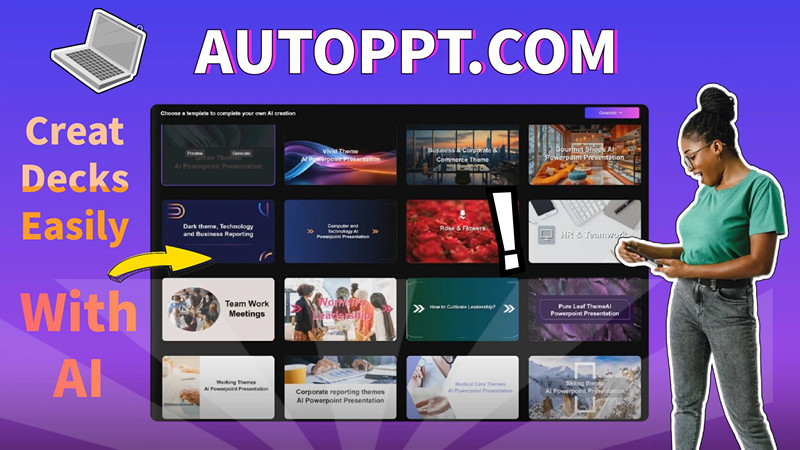
Extensive Template Library
The platform offers a rich collection of beautifully designed templates across various themes and industries. The one-click template switching feature is particularly impressive—you can instantly change your presentation’s entire look without recreating content, making it easy to match different corporate styles or presentation contexts.
AI-Powered Additional Tools
Beyond presentation generation, AutoPPT includes several bonus features:
- One-Click Mind Map Generation: Visualize your ideas instantly
- AI Summarizer: Condense lengthy documents into key points
- AI Chat Integration: Access ChatGPT-style assistance for content refinement
- Chart Generation: Create data visualizations directly within your presentations
Multi-Language Support
With support for over 100 languages, AutoPPT caters to a global audience, making it an excellent choice for international businesses and multilingual presentations.
How It Works: Simple 4-Step Process
- Input Your Topic or Upload Documents: Start by entering your presentation topic or uploading your source material
- Select a Template: Choose from various design styles that match your presentation’s purpose
- Customize Your Slides: Use the intuitive online editor to adjust fonts, colors, layouts, and add tables or charts
- Download and Share: Export your presentation as PPTX, PDF, or image format, or share via a direct link
Pricing Plans: Options for Every Budget
AutoPPT offers flexible pricing options to suit different needs:
- Free Plan: Basic slide generation with limitations—perfect for trying the platform
- Pro Monthly Plan: $19.99/month with file storage and unlimited sharing
- Unlimited Monthly Plan: $39.99/month with chart generation capabilities
- Pro Yearly Plan: $12.49/month (billed annually) with significant savings
- Unlimited Yearly Plan: $24.99/month (billed annually)
- Unlimited Lifetime Plan: One-time payment of $299.99 for lifetime access—the ultimate value for frequent users
The lifetime plan is particularly attractive for professionals who regularly create presentations, costing less than $0.01 per day while offering unlimited generations, template access, and priority support.
Real-World Performance
In practical testing, AutoPPT delivers on its promise of speed. Creating a 20-page presentation truly takes about a minute after uploading content. The AI does an impressive job of structuring information logically, selecting relevant images, and maintaining visual consistency across slides.
The template quality is professional-grade, with modern designs that rival manually created presentations. The ability to switch templates instantly without losing content is a game-changer for those who need to adapt presentations for different audiences.
Who Should Use AutoPPT?
AutoPPT is ideal for:
- Business professionals preparing meetings, reports, or pitches
- Students and educators creating study materials or lectures
- Corporate teams needing consistent, branded presentations
- Entrepreneurs building investor decks or business proposals
- Anyone who values time efficiency without compromising quality
Pros:
✓ Generates comprehensive 20-30 slide presentations quickly
✓ Supports multiple file formats and document uploads
✓ Extensive, high-quality template library
✓ One-click template switching maintains content
✓ Multi-language support for global reach
✓ Additional AI tools (mind maps, chat, summarizer)
✓ Flexible pricing with lifetime option
✓ No design skills required
Final Verdict
AutoPPT successfully delivers on its promise to streamline presentation creation through AI technology. Its ability to generate comprehensive, professionally designed presentations in minutes makes it an invaluable tool for anyone who regularly creates PowerPoint decks. The combination of powerful AI generation, extensive templates, and additional productivity features justifies the investment, especially with the lifetime plan offering exceptional long-term value.
While it may not replace human creativity for highly specialized or artistic presentations, AutoPPT excels at handling the bulk of presentation work efficiently. For professionals seeking to reclaim hours spent on slide design, AutoPPT is definitely worth exploring.
Rating: 4.5/5 stars
Ready to transform your presentation workflow? Visit AutoPPT.com to start creating stunning presentations today with their free trial, or explore their pricing plans to unlock the full potential of AI-powered presentation creation.