OPSLAB Web App Review

by | Feb 11, 2018 | Reviews | 0 comments

Since the rise of “big data” and businesses everywhere scrambling to collect information and become more intelligent,  the importance of keeping this material organized and accessible is more important than ever. But as the growing internal demand for more data sources and for the information they provide to become usable, relevant reports, businesses – data analysts specifically – are often bogged down with more than they can handle.

Sound familiar? Thinking about organizing big data is, well, a big task, and if your not adequately prepared problems will likely arise.

Fortunately, hiring another data analyst full-time to tackle your big data big problem isn’t your only option.
Here’s where OPSLAB comes in to save the day – or maybe your business from drowning in information.

What is OPSLAB?

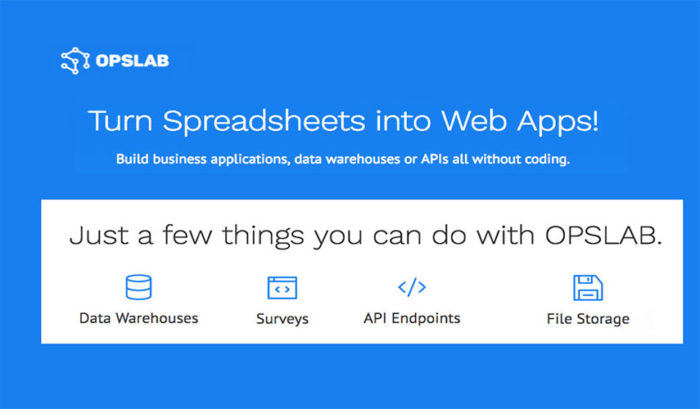
OPSLAB is a web app that works with your business in order to optimize your data and streamline operations by
storing, saving, and backing up information and displaying it on an easy to use interface – no coding required. With OPSLAB, you can build business applications, data warehouses, and APIs (application programming interfaces).

At its core, OPSLAB a great tool for converting excel-based spreadsheets into a scalable format and building
ad-hoc apps, web forms or surveys. But, practically speaking, it’s a program that allows you and your business to get on top of valuable information you’ve collected and convert it into data that makes sense.

Why should I use OPSLAB?

While the manual function of copying and pasting spreadsheets may seem harmless initially, it can become dangerous as the data piles up, and the formulas required to transform the data into useful material gets more complicated.

Ross Kraynak, Product Manager at Leaf Trade, makes a good point about what he calls “Human ETL” (extract, transform, load). He points out that as analysts create processes turning spreadsheets into readable data via unique complex formulas, it becomes increasingly difficult to replace an analyst if they find another job opportunity, and the process left behind can be incomprehensible to their replacement.

This problem is easily avoided if instead of manipulating data with complicated, manual functions, it’s put into
an application customized to your specific purposes. In this sense, OPSLAB is an excellent way to ensure smooth transitions when moving employees internally or adding new players to your team.

What are the downsides?

Of course, streamlining your data into usable, intelligent applications is an attractive offer, so it comes with
a price. Accessing OPSLAB’s services at the Pro tier will cost $25 dollars per user per month for up to 50 users – anywhere between $300 to $15,000 dollars annually. For larger businesses, the Enterprise tier starts at $1500 per month.

They also offer a free option, allowing only one user, 100MB of file storage and 100MB of data storage (more
like a free trial, really).

If you’re not in a position to pay a premium price, there are other free options available, or you can continue to
plug in your data the old-fashioned way. In the end, you get what you pay for – and while OPSLAB can be expensive, reaching a point where you need to hire a second data analyst isn’t cheap either.

The services your business needs is unique, of course. But finding a way to manage all that data can save a lot of
headaches – and possibly your business.

Worth Having WebApp –  Try WebApp Today

Article Summary by AI

OPSLAB streamlines big data management, transforming complex spreadsheets into accessible, actionable insights—all without coding. Ideal for data analysts, it enhances efficiency and reduces manual errors. Say goodbye to data chaos and hello to smarter decision-making! #DataManagement

YOU MAY ALSO LIKE THESE

Top 5 Payroll and HR Web Apps for Small Teams in 2026

Top 5 Payroll and HR Web Apps for Small Teams in 2026

Payroll is one of those business tasks where a small mistake carries an outsized cost, whether that's a missed tax filing deadline or an employee paid incorrectly two pay periods in a row. Manually tracking hours, deductions, and benefits in a spreadsheet works right...

Top 5 Customer Support Helpdesk Web Apps Compared in 2026

Top 5 Customer Support Helpdesk Web Apps Compared in 2026

Once a business grows past a handful of customers, a shared inbox stops being enough to manage support requests, tickets get missed, response times slip, and nobody has a clear view of what's actually outstanding across the whole team. A proper helpdesk web app fixes...

Best Scheduling and Booking Web Apps for Businesses in 2026

Best Scheduling and Booking Web Apps for Businesses in 2026

The back-and-forth of finding a mutually available meeting time still eats up more time than it should for a huge number of businesses, especially client-facing ones juggling appointments across multiple staff members or service types. A good scheduling web app...

Top 5 No-Code Website Builders in 2026

Top 5 No-Code Website Builders in 2026

No-code website builders have closed the gap with custom-coded sites so significantly that most small businesses and freelancers genuinely no longer need a developer just to launch a professional-looking website. The real differences between the top platforms now come...

Best Invoicing and Billing Web Apps for Freelancers in 2026

Best Invoicing and Billing Web Apps for Freelancers in 2026

Chasing late payments is one of the most draining parts of freelancing, and a surprising amount of that friction comes down to sending invoices that look unprofessional, lack clear payment terms, or make it genuinely inconvenient for a client to actually pay. The...

Top 5 Email Marketing Platforms Compared for SaaS in 2026

Top 5 Email Marketing Platforms Compared for SaaS in 2026

Email remains one of the highest-return marketing channels a SaaS company has, but only if the platform behind it handles deliverability, automation, and segmentation properly at scale. Picking the wrong tool early on tends to cause real pain later, migrating a large...

Best Email Marketing Web Apps in 2026 Reviewed

Best Email Marketing Web Apps in 2026 Reviewed

Email marketing consistently delivers the highest return on investment of any digital marketing channel in 2026, with industry analyses regularly showing returns of thirty to forty dollars for every dollar invested in well-executed campaigns. The platform you use to...

Best CRM Web Apps for Small Business in 2026

Best CRM Web Apps for Small Business in 2026

A CRM - Customer Relationship Management tool - is the single highest-leverage software investment most small businesses make in 2026. Without one, client information lives across email threads, spreadsheets, sticky notes, and individual team members' memories,...

How to Make Money with Web Apps in 2026

How to Make Money with Web Apps in 2026

Building a web app is only half the equation. Choosing the right monetisation model in 2026 determines whether it becomes a profitable business or a passion project that costs you money to maintain. Many technically excellent products fail not because of what they...

Top 5 Web App Dev Tools for Startups 2026

Top 5 Web App Dev Tools for Startups 2026

Speed matters most for startups. The right development tools in 2026 can take a web app from idea to production in days rather than months. The wrong tools create technical debt, deployment friction, and team onboarding costs that slow you down at exactly the moment...