Let’s be honest – picking the right AI model for your project can feel overwhelming. There are hundreds of LLMs out there, leaderboards that don’t reflect real-world performance, and shiny new model releases every other week. Sound familiar?
That’s exactly the problem OpenMark AI was built to solve. We spent a full week putting it through its paces, and here’s everything you need to know.
So, What Actually Is OpenMark.ai?
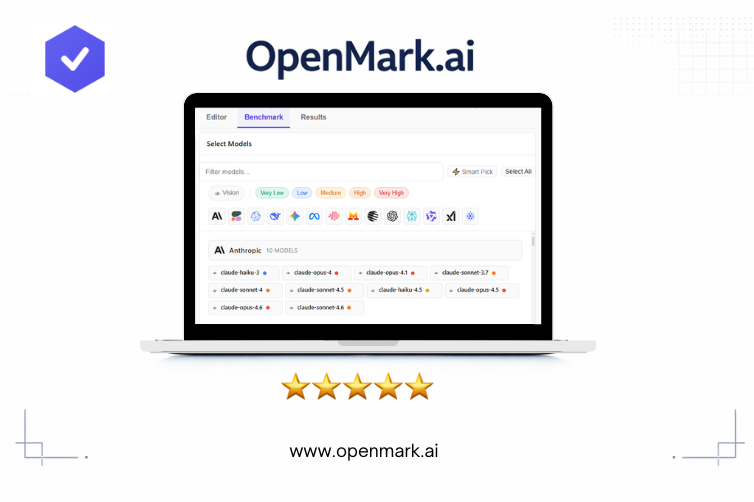
OpenMark AI is an AI model benchmarking platform where you can test 100+ large language models against your own real-world tasks – no API keys, no code, no complicated setup. Backed by Google Cloud for Startups, it’s clean, fast, and surprisingly easy to get into even if you’re not a hardcore engineer.
The idea is simple: you tell it what you want to test, it generates test cases, you pick the models you want to compare, and then you hit go. A few minutes later, you’ve got a detailed scorecard with accuracy, cost, speed, and consistency scores for every model you selected. Pretty neat, right?
Getting Started: Easier Than We Expected
On Day 1, we jumped straight into the Editor – the place where you build your benchmark task. There are three ways to work:
- Simple Mode – just describe your task in plain language and the AI creates test cases for you
- Advanced Mode – use structured forms to define exactly what each test should do
- Manual Mode – write raw YAML if you like full hands-on control
We started with Simple Mode, typing a quick description of a classification task. Honestly, we expected it to need a lot of hand-holding. It didn’t. Within five minutes, we had a complete benchmark ready to run – test prompts, expected answers, and scoring config all auto-generated. First impressions? Very good.
Running Benchmarks: The Fun Part
By Day 2, things got really interesting. The Smart Pick button automatically chooses around 8 models from different providers and price tiers, giving you a balanced comparison without any bias creeping in. It’s a great starting point if you don’t want to spend time curating a model list yourself.
The configuration panel gives you more control than you might expect:
- Stability Runs – run each test multiple times to see how consistent the model really is
- Find Optimal Temperature – this one’s brilliant; it auto-tests different temperature settings and tells you which works best for your specific task
- Max Tokens – keeps your costs predictable
- Timeout Profile – “Snappy” for quick tasks, “Patient” for heavier reasoning jobs
Results show up in a clean, sortable table. Each row gives you a model’s accuracy score, stability rating, recommended temperature, actual cost per run, response time, and two really useful efficiency metrics: Acc/$ (accuracy per dollar) and Acc/min (accuracy per minute). Those two columns alone helped us avoid two models we would have otherwise chosen without thinking twice.
Where It Gets Really Useful
Clicking on any result row opens a full breakdown – every test case, the exact prompt that was sent, and the model’s actual response. This is where OpenMark AI really earns its stripes.
We went back and refined our prompts three times based on what we saw in there. When a model failed a test, it was always clear why – either the expected output needed tweaking, or the prompt had a gap in it. There’s even a helpful in-app tip that says: “Low accuracy across all models often means the tasks need refinement – not that the models failed.” We loved that. It keeps you focused on improving your setup rather than blaming the AI.
Exporting results is dead simple too – CSV, JSON, or a plain-text summary. The Share feature generates a shareable image of your results in seconds, perfect for dropping into a team chat or a presentation without any extra work.
The Bits That Really Stand Out
No guesswork, just data. OpenMark AI uses scoring criteria you define – not subjective “which feels better” voting. Results are objective and reproducible every single time.
Catches model drift before it hurts you. AI providers quietly update their models all the time. A model that worked great three weeks ago might behave totally differently today. Regular benchmarks on OpenMark AI catch that drift early, before it becomes a live product problem.
Zero technical setup. No API keys to wrangle, no environment to configure. This is huge for smaller teams or anyone who just wants to get straight to the comparison.
Real cost data. Every benchmark shows what each run actually cost, calculated from real token usage – not a vague estimate. You know exactly what you’re paying before you commit to a model at scale.
Pricing: Flexible and Fair
OpenMark AI works on a credit system. The Free tier is genuinely usable – not a watered-down teaser. If you need more power, paid plans (Pro and Expert) unlock larger task storage, bigger job queues, and more. One thing we especially liked: purchased credit packs never expire. So if you benchmark in bursts rather than daily, you’re not losing anything between sessions.
Our Final Verdict
After a full week with OpenMark AI, we’re genuinely impressed. It takes one of the messiest parts of working with AI – figuring out which model is actually right for your use case – and makes it fast, objective, and accessible to just about anyone.
Whether you’re building a customer-facing chatbot, a data extraction pipeline, or anything else powered by an LLM, you deserve to make that model choice based on real evidence, not vibes. OpenMark AI gives you exactly that.
5 stars. Highly recommended. Go try it – the free tier is a great place to start.