iFile – A Low Cost File Management App

by | Oct 13, 2012 | Reviews | 0 comments

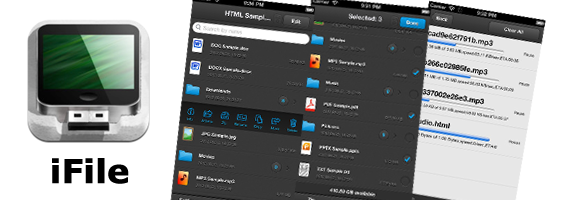
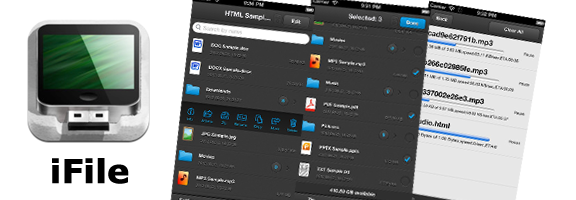
iFile is a file management app which helps the users to organize and maintain all their important documents in a single place. The app helps to turn your mobile phone into a mini laptop in which you can manage all your documents at your fingertips. iFile app has been developed and launched by Darkness Production Company for the iPhone and the iPad users. The app requires iOS 5.0 or the later versions. iFile is a multi-functional file management app which acts a file manager, text editor, PDF reader, document photo viewer, sound recorder, music player and also to zip and unzip the files. The app does all the tasks in order to manage the files on your iPhones and iPad’s.

The iFile app helps the users to override the problem of the lack of file browsers in the iPhone and iPads. There is no file structure in these devices that can aid in creating files or folders and moving around the files from one location to another. iFile fills these gaps efficiently. The app helps the users to download essential files from the internet and aggregates the online services such as Mobile Me and Drop box in one place and maintains a good cloud based workflow. iFiles also has a feature which will enable the users to send and receive data through Blue Tooth or Wi-Fi to another iPhone that has the iFiles app. The app is best for transferring data between the PC’s, iPhones, Mac’s and iPad’s.

Features:

  • Customizable multi touch control options that help the app to operate at a great speed.
  • The app can be used for any type of file formats such as MS Word, video, text, images, iWork, PDF, Source code (c, cc, html, xml, h, m, htm and others) and archive files such as zip and ipa.
  • The File Manager app also helps in sorting the files and has a video gallery and image gallery where the users can store their favorite videos and images.
  • The PDF reader in the app has features such as convenient page display, adding book marks, displaying page thumbnails, instant navigation through the pages and also the ability to print and mail the PDF content.
  • Import and Export files through Wi-Fi, Bluetooth, iPod Library, using iCloud by using inline services such as Drop box or through USB via iTunes.
  • The users can do multiple downloads at the same time. The app also allows them to pause and later continue the download from the location in which it was stopped.
  • It also offers other options such as Omni box, Private mode browsing, setting up of the home page and to keep track of your bookmarks and browsing history.
  • The app offers local notification support and multi touch gestures that can be configured.

Summary:

iFile provides customers an efficient way to manage and organize their files in a single place. The app is available for download in the iStore for just $1.99, so download the app and organize your files in an effective way.

Worth Having Application – Download the Application

Article Summary by AI

iFile transforms your iPhone/iPad into a powerful file management tool, unifying document organization, editing, and cloud syncing. With customizable controls and support for multiple file types, it bridges the gap in iOS file handling. Ideal for users needing seamless document management on-the-go!

YOU MAY ALSO LIKE THESE

Best Web Apps for Building Internal Company Wikis in 2026

Best Web Apps for Building Internal Company Wikis in 2026

Every growing company eventually hits the point where institutional knowledge, how a process actually works, where a specific decision came from, why a system was built a certain way, lives only in a few people's heads, creating genuine risk when those people are...

Top 5 Cloud Document Management Web Apps for Business in 2026

Top 5 Cloud Document Management Web Apps for Business in 2026

Important business documents scattered across individual email attachments, local hard drives, and a handful of forgotten folders make finding a specific file genuinely frustrating right when it's needed most, often during a client call or an urgent deadline. Cloud...

Top 5 Online Course and LMS Platforms for Creators in 2026

Top 5 Online Course and LMS Platforms for Creators in 2026

Turning genuine expertise into a structured, sellable online course used to require piecing together separate video hosting, payment processing, and student progress tracking tools manually, a genuinely significant technical barrier for creators who just wanted to...

Top 5 Inventory Management Web Apps for Small Business in 2026

Top 5 Inventory Management Web Apps for Small Business in 2026

Tracking inventory through a spreadsheet or, worse, memory alone works fine for a business with a handful of products, but it breaks down quickly once a growing catalog spans multiple sales channels, a physical location, and an online store simultaneously, each...

Top 5 Helpdesk and Customer Support Web Apps in 2026

Top 5 Helpdesk and Customer Support Web Apps in 2026

A shared email inbox works fine for customer support right up until multiple team members start replying to the same message, or a customer's history gets lost across a dozen scattered email threads with no clear record of what was already promised. Helpdesk and...

Top 5 Email Marketing Web Apps for Small Businesses in 2026

Top 5 Email Marketing Web Apps for Small Businesses in 2026

Despite years of predictions that email marketing would fade in favor of social media, it consistently remains one of the highest-return marketing channels available to small businesses, largely because it reaches people in a space they actually check regularly rather...

Top 5 Payroll and HR Web Apps for Small Teams in 2026

Top 5 Payroll and HR Web Apps for Small Teams in 2026

Payroll is one of those business tasks where a small mistake carries an outsized cost, whether that's a missed tax filing deadline or an employee paid incorrectly two pay periods in a row. Manually tracking hours, deductions, and benefits in a spreadsheet works right...

Top 5 Customer Support Helpdesk Web Apps Compared in 2026

Top 5 Customer Support Helpdesk Web Apps Compared in 2026

Once a business grows past a handful of customers, a shared inbox stops being enough to manage support requests, tickets get missed, response times slip, and nobody has a clear view of what's actually outstanding across the whole team. A proper helpdesk web app fixes...

Best Scheduling and Booking Web Apps for Businesses in 2026

Best Scheduling and Booking Web Apps for Businesses in 2026

The back-and-forth of finding a mutually available meeting time still eats up more time than it should for a huge number of businesses, especially client-facing ones juggling appointments across multiple staff members or service types. A good scheduling web app...

Top 5 No-Code Website Builders in 2026

Top 5 No-Code Website Builders in 2026

No-code website builders have closed the gap with custom-coded sites so significantly that most small businesses and freelancers genuinely no longer need a developer just to launch a professional-looking website. The real differences between the top platforms now come...

Best Invoicing and Billing Web Apps for Freelancers in 2026

Best Invoicing and Billing Web Apps for Freelancers in 2026

Chasing late payments is one of the most draining parts of freelancing, and a surprising amount of that friction comes down to sending invoices that look unprofessional, lack clear payment terms, or make it genuinely inconvenient for a client to actually pay. The...

Top 5 Email Marketing Platforms Compared for SaaS in 2026

Top 5 Email Marketing Platforms Compared for SaaS in 2026

Email remains one of the highest-return marketing channels a SaaS company has, but only if the platform behind it handles deliverability, automation, and segmentation properly at scale. Picking the wrong tool early on tends to cause real pain later, migrating a large...